
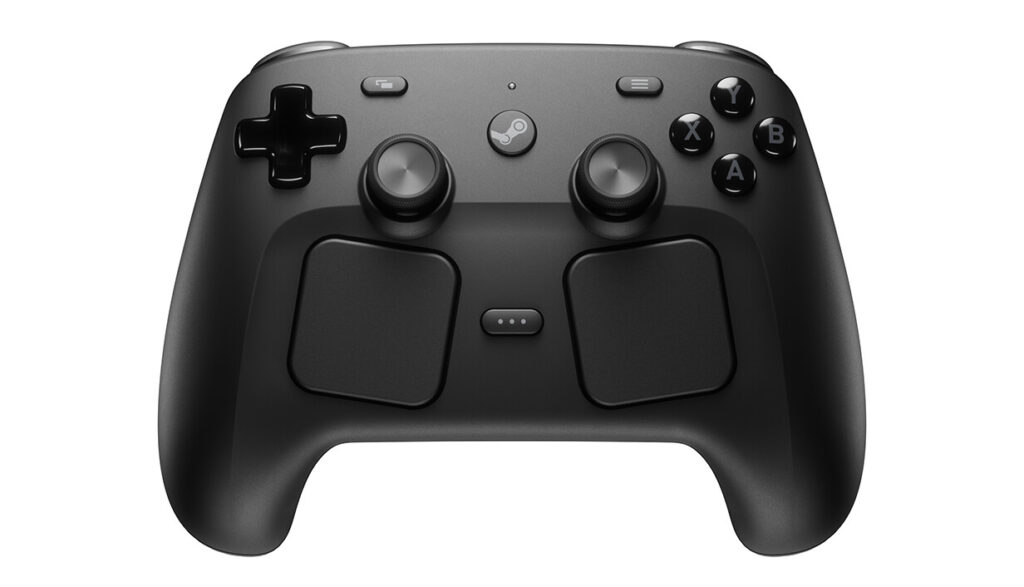
In May 2026, the Steam Controller sold out in thirty minutes and briefly broke Steam’s payment servers. If you weren’t in the queue at 10 AM Pacific on May 4, you missed the open first wave. Valve moved to a reservation and waitlist system afterward. As of September 2026, some buyers still get invite windows in late 2026, while later sign-ups are often looking at 2027.
So the question is real: is this thing actually worth $99? And more specifically do you need a Steam Machine to justify buying one, or does it stand on its own as a PC controller?
Short answer: it stands entirely on its own. The Steam Machine connection is a bonus, not a requirement.
What the Steam Controller 2026 Actually Is
This isn’t the 2015 original with the single stick and the weird round trackpads that everyone mocked. Don’t let the name fool you.
The 2026 Steam Controller is essentially a Steam Deck stripped of its screen. Same input layout, same control philosophy, built for exactly the same purpose: letting you play PC games including games designed for mouse and keyboard from a couch, bed or living room without compromising how they feel.
Here’s what’s on it. Two full-size TMR thumbsticks with capacitive touch. Two 34.5mm square trackpads with haptic feedback. A 6-axis gyroscope. Four remappable rear grip buttons. Standard face buttons, D-pad, triggers, bumpers, the Steam button and the Quick Access Menu button. An 8.39Wh Li-ion battery rated for 35+ hours. It connects via the included Puck (a 2.4GHz wireless receiver that doubles as a magnetic charging dock), USB-C wired, or Bluetooth. At 292 grams, it’s about the same weight as an Xbox controller with batteries.
That spec sheet at $99 puts it alongside the standard DualSense ($75) and above the standard Xbox Wireless Controller ($54-$79), but well below the DualSense Edge ($200) and Xbox Elite Series 2 ($149-$180). The comparison to the Elite controllers is the right one those are the products competing for the same buyer.
TMR Sticks: Why This Actually Matters
Sony and Microsoft are still shipping potentiometer-based thumbsticks in their flagship controllers in 2026. The same mechanical contact system that’s been causing drift since the Xbox 360. They haven’t changed this, and the reason isn’t engineering it’s economics. Replacing working sticks costs money; letting customers buy new controllers when old ones drift also makes money.
TMR (Tunnel Magnetoresistance) is a contactless magnetic sensor that determines stick position without physical wear surfaces. It’s more precise, uses less power, and doesn’t develop drift through use. Valve uses the same technology in the Steam Deck OLED, which has been in the wild for over a year without significant drift reports.
The practical upside isn’t just longevity. TMR sticks also have capacitive touch they detect when your finger is resting on them without pressing. This enables Grip Sense, which can automatically activate the gyro when you touch the sticks. The result is a seamless transition between stick aiming and gyro fine-tuning in supported games. If you’ve never used gyro aiming properly configured, it’s genuinely difficult to go back to sticks-only once you have.
The Steam Controller’s sticks also include Hall effect sensors on the triggers, not potentiometers. Tom’s Hardware confirmed this in their review. The stick and trigger hardware throughout this controller is categorically better than anything on a standard Xbox or DualSense at this price.
The Trackpads: The Feature No Competitor Has

Two 34.5mm square trackpads sit below each thumbstick. They use Linear Resonant Actuators for haptic feedback and are pressure-sensitive configurable click thresholds, precise cursor movement, scrolling, radial menu navigation.
This is where the Steam Controller earns its price and its reason to exist. No other mainstream PC controller ships with trackpads that function as a genuine mouse replacement. The DualSense has a touchpad but it’s small, inaccurate, and not designed for cursor work. The Steam Controller’s trackpads are designed specifically for navigating PC games and desktops from a distance.
What this unlocks practically: strategy games, management games, older PC games with interface-heavy design, desktop navigation, scrolling through the Steam library all of it works naturally from the couch without reaching for a separate keyboard or mouse. PC Gamer’s reviewer put it well: you can whip across the screen with the gyro, switch to the trackpad for precise targeting, and use the other trackpad to scroll through a Steam sale. No other controller does this.
There’s a learning curve. Trackpad navigation isn’t instant it takes a session or two to build the muscle memory. Reviewers who expected it to feel like a mouse immediately were disappointed. Reviewers who gave it a few hours came out converts.
The Gyro: Underrated, Properly Implemented
The 6-axis gyroscope is the third leg of what makes this controller interesting. Gyro aiming, when it’s configured well, sits between the precision of a mouse and the convenience of a thumbstick you use the right stick for coarse aiming, then tilt the controller slightly for fine adjustments. The difference in accuracy is measurable.
Grip Sense ties into this. Touch sensors on the rear grips and on the thumbstick caps detect contact and can activate the gyro automatically so gyro kicks in when your thumb rests on the stick, and turns off when you lift it. The transition is seamless enough that you stop thinking about it within a few minutes.
PC Gamer’s reviewer called gyro aiming “shockingly better” than thumbsticks for mimicking mouse movement and described themselves as a convert after the review period. TechRadar rated it a highlight of the hardware. The gyro implementation here isn’t an afterthought.
The Rear Buttons: Useful With One Caveat
Four remappable grip buttons sit on the back two on each side, positioned low on the inside of the grips. The top pair (L4/R4) click satisfyingly and are easy to distinguish by feel. The lower pair (L5/R5) are accessible but easier to press accidentally until you’re used to them.
PC Gamer specifically called out the lower buttons as prone to accidental inputs during their review period. It’s not a dealbreaker muscle memory handles it after a few hours but it’s worth knowing before you set them to something irreversible like a grenade throw.
Deep Steam Input integration means every button is remappable with per-game profiles. Community layouts already exist for most major Steam titles, meaning you can download a control scheme someone else built and start playing in thirty seconds. For games that don’t have native controller support, this is how you make them work properly.
The Puck: Clever Charging, One Watch Out
The Steam Controller Puck is a 2.4GHz wireless receiver that doubles as a charging dock. Plug it into USB-C, set it on your desk or TV stand, and magnetically park the controller face-down on it when you’re done. It charges automatically on contact.
Wireless latency through the Puck is around 8ms end-to-end at 5 metres with a 4ms polling rate. That’s competitive with any current wireless controller and faster than Bluetooth.
One genuine warning: keep metallic objects away from the Puck. The magnetic charging contacts are strong enough that a metal watchband contacting the pins has caused heat events in at least one documented case. Valve has pushed a firmware update addressing a related charging issue. This isn’t a reason to avoid the controller it’s a reason to treat the Puck like you would any exposed magnetic charging interface. Don’t pile things on top of it.
Battery Life: 35 Hours Is Correct
Tom’s Hardware ran it for extended sessions and confirmed the 35-hour rating is accurate under normal play with gyro and haptics used moderately. PC Gamer ran eight hours of continuous play and the indicator was still fully green. The reviewer stated they’d never reached the end of a charge in the review period.
Compare that to the DualSense Edge at around five hours per charge, or a standard DualSense at eight to twelve hours. The Steam Controller wins this category by a significant margin. The Puck charging means top-ups are effortless just set it down. In practice, battery management becomes a non-issue.
The Software Side: The One Real Limitation
The Steam Controller runs on Steam Input. Inside Steam, it’s one of the most customizable controllers ever shipped at this price. Outside Steam, it’s significantly less useful.
Epic Games Store, Game Pass, standalone game launchers that don’t talk to Steam you can add these as non-Steam games and build manual controller profiles, but it requires configuration work that isn’t documented clearly and doesn’t always behave consistently. PC Gamer found workarounds for Kingdom Come: Deliverance II via Epic but described the process as “funky at best.”
If 90%+ of your gaming is through Steam, this isn’t a problem. If you regularly play across multiple storefronts and want one controller that just works everywhere without setup, the Xbox Wireless Controller is still the universal standard.
It also won’t work with PS5, Xbox or Nintendo Switch natively. No console compatibility at all. This is a PC controller.
Who Should Buy the Steam Controller
You game from a couch or living room setup. You play through Steam primarily. You want gyro aiming, trackpad navigation, or both. You play strategy games, older PC games, or anything interfacing heavily that normally requires a keyboard. You have a Steam Deck and want the same input layout at your TV.
Don’t buy it if your library is split across multiple storefronts and you don’t want to configure layouts manually. Don’t buy it if you need console compatibility. Don’t buy it expecting it to feel like a mouse immediately without a learning curve.
The Steam Machine pairing makes it better buying both at once bundles the controller for $79 rather than $99 standalone, and the hardware shares the same input design as the Steam Machine’s SteamOS interface. But you don’t need the Steam Machine to justify the purchase. This is a complete product on its own.
How to Get One

Sold exclusively through the Steam Store. Add it to your Steam wishlist Valve has stated they’ll notify wishlisted users when restocks arrive. The first wave sold out within thirty minutes of launch. Valve has confirmed more stock is coming but hasn’t given a timeline. The regional Komodo Station distributor handles Asia/Pacific availability.
$99 USD / £85 / €99 / $149 CAD / $149 AUD.
SpecClear participates in affiliate programmes. When you purchase through links on this site we may earn a commission at no additional cost to you.