
The HX1000i SHIFT CRYSTAL power supply is the most overlooked component in any build. It sits at the bottom of the case, hidden behind a shroud, doing its job quietly while everything else gets the attention. Corsair looked at that situation and decided to fix it with a poly-carbonate window.
The HX1000i SHIFT CRYSTAL is a 1000W Platinum-rated PSU with transparent panels on three sides, a white PCB, colour-matched capacitors, a 140mm RGB fan, and PinProtect+ built directly into the 12V-2×6 connector. Announced at Computex 2026 after being shown as a prototype at Computex 2025 it’s the most visually distinctive power supply Corsair has ever shipped.
Retail pricing still isn’t confirmed as of September 2026, and availability remains a later-2026 window. But the spec sheet is fully public, and everything worth knowing about what this PSU is and who it’s for is already on the table.
What the HX1000i SHIFT CRYSTAL Actually Is
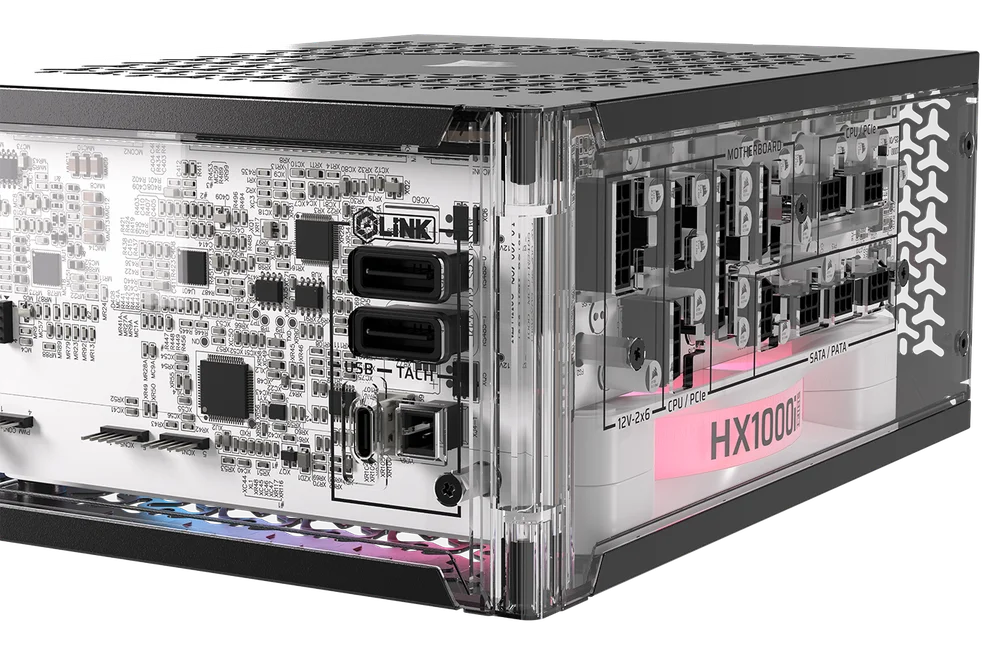
This is the standard HX1000i SHIFT platform a PSU Corsair released in October 2025 and that Tom’s Hardware reviewed as a strong if ecosystem-dependent choice with three things added: transparent polycarbonate panels on three sides, a white PCB with colour-matched components, and a 140mm RGB Magnetic Dome bearing fan to illuminate the internals.
The practical result is a PSU you can see into. The PCB is white. The capacitors are custom Corsair-spec units rated to 105°C and colour-matched to the aesthetic. With the RGB fan running and the transparent panels catching case lighting, the internals are visible from any side of the unit.
Corsair’s framing for this is unambiguous: they call it the first time they’ve revealed the inner details of a PSU, and they’re treating the visibility as a statement of engineering confidence. If your internals look that clean, you show them. That logic holds up when you look at the component quality behind the panels.
The panels themselves are polycarbonate the same material used in PC case side windows. It’s lightweight, impact-resistant, and optically clear. One commenter on VideoCardz raised the obvious maintenance question about dust accumulation on transparent surfaces. That’s a real consideration for anyone thinking about this unit in a dust-prone environment. A mesh case with positive pressure filtration mitigates it. An open-air test bench or a case with poor filtration will show every particle.
The Spec Sheet: HXi Platform Underneath
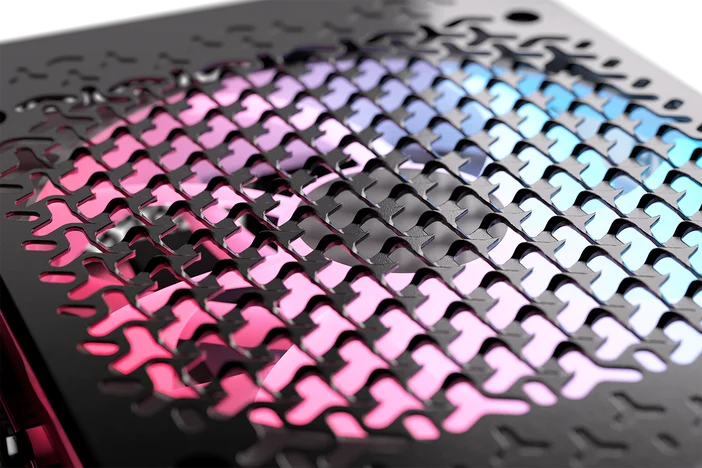
Strip away the Crystal treatment and you’re working with the HXi SHIFT foundation, which is a serious piece of hardware.
1000W of continuous output at Cybenetics Platinum efficiency that means up to 91% efficiency at nominal loads. Less heat generated inside the unit, quieter fan operation, and lower electricity cost over time compared to Gold-rated alternatives. For a unit that’s meant to be visible, running cool and quiet matters more than usual.
ATX 3.1 and PCIe 5.1 certification. One native 90-degree 12V-2×6 connector rated for up to 600W enough headroom for an RTX 5090 (575W TDP) paired with a high-end AM5 CPU without needing an adapter cable. No legacy proprietary connector situation here.
Fully modular with Type-5 cables the same smaller, denser connector format Corsair uses across the HXi SHIFT lineup. Premium individually sleeved cables with low-profile combs are included. Side-mounted SHIFT connectors, meaning cables exit perpendicular to the unit’s length rather than from the rear. In a case designed around SHIFT layout, cables route directly behind the motherboard tray and effectively disappear from view.
The 140mm fan uses Magnetic Dome bearing technology a step up from standard fluid dynamic bearings in terms of longevity and noise at low RPM. Zero RPM mode keeps it completely silent at low and medium loads. The RGB lighting on the fan is controlled through iCUE, same as every other Corsair component in the ecosystem.
Ten-year warranty. For a PSU you’re paying premium money for and installing in a premium build, that warranty is part of what you’re buying.
The Integrated iCUE LINK System Hub
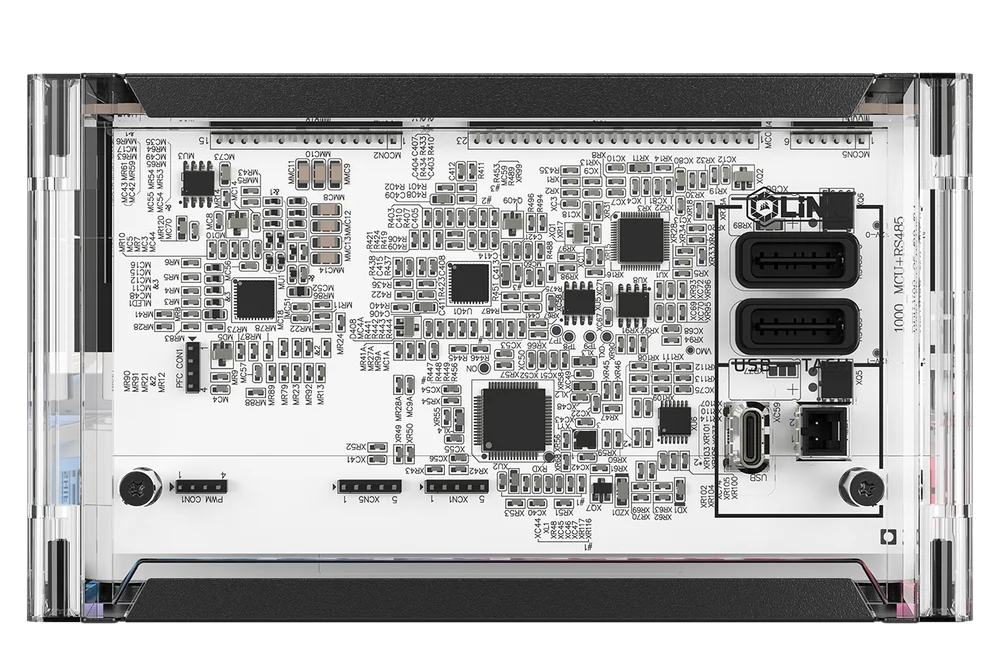
This is the feature that separates the HXi SHIFT platform from standard PSUs in a Corsair ecosystem build, and it deserves a proper explanation.
A typical iCUE LINK build requires a separate System Hub mounted inside the case, powered by a 6-pin PCIe cable drawn from the PSU. The HX1000i SHIFT CRYSTAL has the System Hub built directly into the PSU. It’s not a passthrough it’s internal. iCUE LINK devices connect directly to the PSU itself, the hub is already powered by the unit’s internal rails, and the external 6-pin PCIe cable to power the hub is eliminated entirely.
The integrated hub supports up to 24 iCUE LINK devices. Your AIO cooler, case fans, RGB strips, the PSU’s own fan all of it talks to the same hub, controlled through one software interface, with one less cable inside the case.
For someone building an all-Corsair system this is a genuinely meaningful simplification. For someone building with mixed brands, the hub sits dormant and adds no value. That’s the same ecosystem dependency caveat that applies to every iCUE LINK product know which camp your build falls in before you price this unit.
PinProtect+: Why This Matters in 2026
The RTX 5090 draws up to 575W through a single 12V-2×6 connector. The RTX 4090 before it drew up to 450W through what was then 12VHPWR. Early adopters of that connector generation dealt with melted connectors when cables weren’t fully seated the sense pin system in the 12V-2×6 standard was specifically designed to reduce that failure mode, but it doesn’t eliminate the risk entirely if a connector is partially seated or a cable develops a fault under sustained high current.
PinProtect+ monitors the current flowing through every individual pin in the 12V-2×6 connection in real time. When current through any pin or combination of pins exceeds the user-configurable threshold, the PSU cuts power to the connector immediately shutting down the GPU, ending power delivery, and preventing damage from excessive current.
The “+” in the name means you get full visibility through iCUE: live pin-level current monitoring, software alerts, and the ability to set your own threshold rather than relying on a fixed hardware cutoff. The base PinProtect (without the +) does the same protective action but without the monitoring layer and without user-adjustable thresholds.
This is one of the first Corsair PSUs to ship with PinProtect+. It’s not a marketing feature for anyone running an RTX 5090 or any future GPU that pushes 12V-2×6 power delivery to its limits, having per-pin hardware protection integrated into the PSU rather than relying on the GPU’s own overcurrent logic is a meaningful safety layer.
The Case Compatibility Question
SHIFT PSUs require a case with specific clearance. The connectors exit from the side of the unit, not the rear, which means the case needs to accommodate cables running perpendicular to the PSU’s length rather than directly behind it.
Corsair builds its own cases around SHIFT compatibility the Frame 4000X and 4500X both appear in Corsair’s official build showcases with the CRYSTAL installed. Any case marketed as SHIFT-compatible handles this correctly.
The complication arises with non-SHIFT cases. Standard cases route PSU cables from the rear of the unit through a cutout in the motherboard tray. A SHIFT PSU in a standard case works electrically but loses all the cable management advantage cables route awkwardly rather than cleanly. You also need 30mm of clearance between the PSU and side panel for the connectors to exit without obstruction.
If you’re buying the HX1000i SHIFT CRYSTAL for a transparent build where the PSU is visible, you’re almost certainly pairing it with a case that either has a dedicated PSU window or mounts the PSU in a visible position. That kind of build is already what SHIFT was designed for. The Corsair Frame 4500X was literally the Computex showcase build for this unit. It’s the natural pairing.
Who This PSU Is For
Build the honest picture before you spend the money.
This is for builders doing a high-end Corsair ecosystem build in a case where the PSU is visible. The transparent panels make no sense if the unit is hidden behind a shroud. The RGB fan makes no sense if nobody can see it. The white PCB and colour-matched capacitors matter only when they’re on display. If any of those conditions aren’t met, buy the standard HX1000i SHIFT this becomes the same platform, same electrical performance, same warranty and lower price.
If those conditions are met you’re building in a case with a clear PSU window or an open side, running Corsair iCUE LINK across the build, pairing with an RTX 5090 or similarly power-hungry GPU, and you want PinProtect+ monitoring alongside a PSU that looks as good as everything else in the case this is exactly the right product.
Don’t buy it as a pegboard wall-mount showpiece without filtering the dust situation first. A transparent PSU collecting visible dust inside three polycarbonate panels defeats the entire visual purpose within a few months in most environments.
Availability and Pricing
Announced at Computex 2026. Retail pricing not confirmed at time of writing. The standard HX1000i SHIFT without the Crystal treatment currently sells for around $300 on Corsair’s store (often listed near $299.99). The Crystal version with transparent panels, RGB fan, PinProtect+, and the white PCB treatment will carry a premium above that. Retail pricing for Crystal still isn’t public as of September 2026, and Corsair has only pointed to a later-2026 window rather than a firm street date.
Monitor Corsair’s direct store for listings as the release approaches.
SpecClear participates in affiliate programmes. When you purchase through links on this site we may earn a commission at no additional cost to you.