
AMD has confirmed that part of its Radeon driver package can keep writing to your system drive around the clock, even when your PC is sitting idle. The culprit is a background process called atieclxx.exe, the AMD External Events Client Module, which belongs to AMD’s External Events Utility. AMD’s fix is planned for Adrenalin 26.11.1, and as of 12 November 2026 we could not find that driver on AMD’s site yet. Until it lands, here is how to find out whether you are affected, what the writes might actually cost you, and what you can safely do about it.
We have not reproduced this bug ourselves. Everything below comes from AMD’s release notes, statements AMD staff posted on the company’s community forum and Reddit as reported by TechPowerUp, Tom’s Hardware, VideoCardz and PC Gamer, and measurements from owners who tested their own PCs. Where something is a user report rather than an AMD statement, we say so.
The short answer
Open Windows Resource Monitor, go to the Disk tab and see whether atieclxx.exe is writing steadily while your PC is idle. If it is not, you are fine and can ignore all of this. If it is, the simplest safe options are to wait for Adrenalin 26.11.1, or to disable the AMD External Events Utility service until the fix arrives. The second one can break Adrenalin hotkeys and some display features, so it is a trade, not a free fix. Do not panic either way, because most reported write rates add up to a small slice of a modern drive’s rated endurance.
What AMD has actually said
The bug is not new. AMD community rep AMD_Matt replied to a user on 21 October that the company was “looking into it with the aim to resolve it in a future driver release.” A second rep, AMD_Vik, later said on Reddit that the problem appears to be an interaction between the External Events Utility and Microsoft’s PCIe filter driver, that a fix has been submitted, and that Adrenalin 26.11.1 should carry it. Tom’s Hardware quotes him as saying it is “hopefully fixed in the next one,” so the outlets word it slightly differently, and AMD has not published a firm release date beyond later in November.
AMD’s own release notes do not mention the problem. We checked the notes for 26.10.1 (updated 20 October 2026) and 26.10.2 (updated 30 October 2026), and neither lists excessive disk writes as a known or fixed issue. This is also not the first time AMD’s software has been caught doing something similar. Tom’s Hardware notes that a Redditor found AMD chipset software repeatedly updating a log file last November.
Who is affected
AMD and the outlets name Adrenalin 26.10.1 and 26.10.2, which is why those versions are in the headlines. The picture is messier than that, though. One user on X says he has seen the behaviour since Adrenalin 26.7.1 in June, and an AMD community thread from July describes constant disk writes on 26.6.4. Tom’s Hardware found no clear pattern across driver versions and says the problem may not be limited to the latest release.
It also does not hit everyone. PC Gamer’s own AMD-card tester could not reproduce it, and plenty of owners report quiet disks even on 26.10.2. Reports so far involve Windows 10 and Windows 11 only. The honest summary is that nobody knows exactly which hardware and software combinations trigger it, so you need to check your own PC.
How to check your PC
- Resource Monitor. Press Win + R, type
resmonand press Enter. Open the Disk tab, click the Write (B/sec) column to sort, and leave your PC alone for a few minutes with nothing else running. If atieclxx.exe (Tom’s Hardware also mentions atiesrxx.exe) sits near the top with a steady stream of writes, you have the bug. - Task Manager. The Processes tab shows a Disk column for a quick look. On the Details tab you can right-click a column header, choose Select columns and add I/O write bytes to see a running total per process. If that number for atieclxx.exe keeps climbing while the PC is idle, the bug is confirmed.
- CrystalDiskInfo. This free tool reads your SSD’s SMART data. Write down the health percentage and, on drives that report it, the Total Host Writes figure. Check again after a day or two. A steady climb while you have barely used the PC points to a background writer. Some owners have also traced the activity to log files in
Windows\System32\AMD\EEUDumps.
Reported rates vary a lot. Most owners see 0.3MB/s to 1.5MB/s, and one user measured about 5MB/s. Our guide to monitoring your PC covers the free tools if you want a longer-term view.
These numbers look tiny in the grand scheme of things, but that doesn’t mean they should be ignored. Left unchecked over months and years, they add up to real wear and tear on an SSD.
What the writes actually cost you
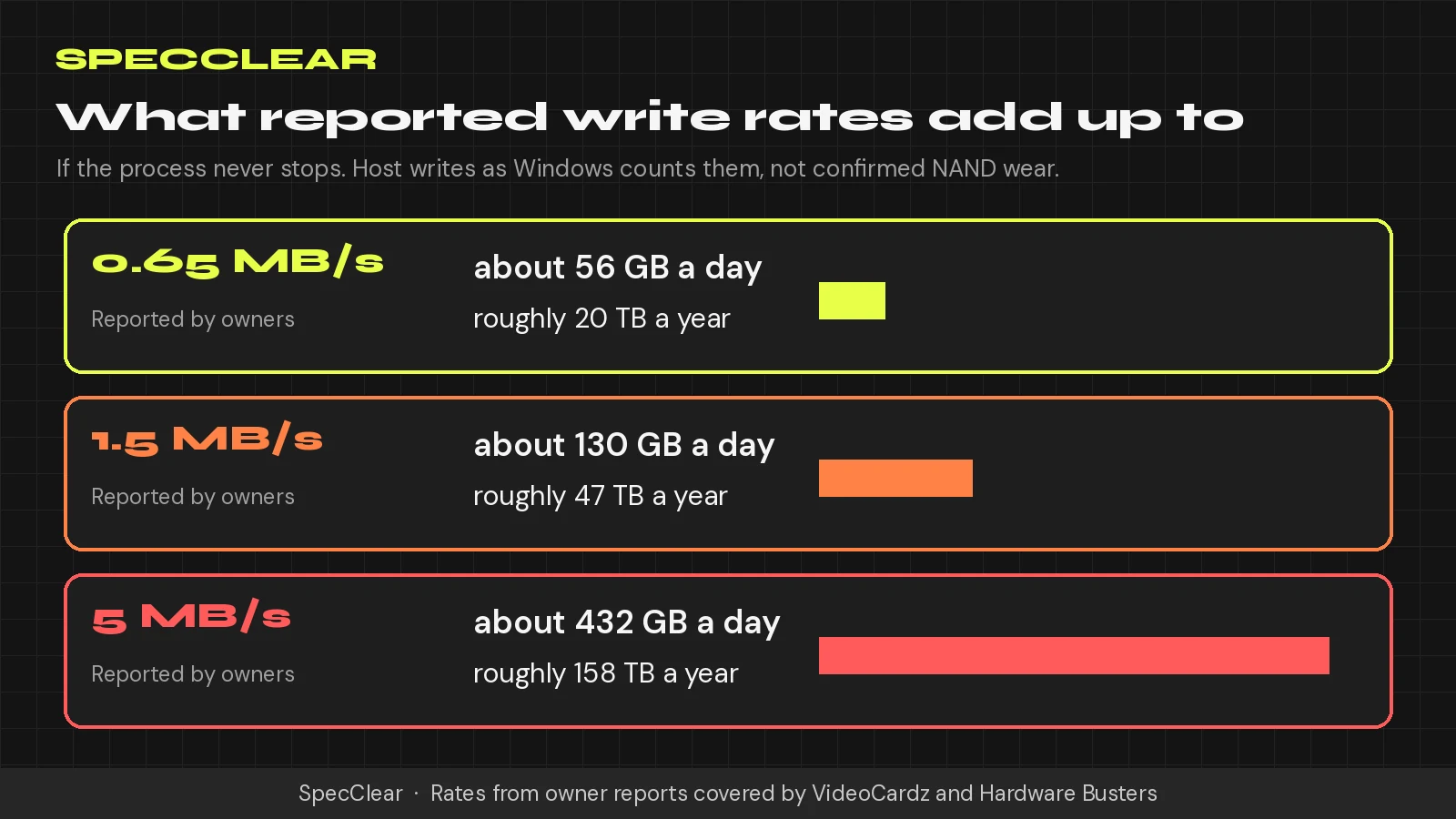
Megabytes per second sounds harmless, so here is the maths if the process runs nonstop. These are host writes as Windows counts them, not writes that land on the flash, because controller caching can change the real number. Nobody has published a controlled test of actual wear, and VideoCardz stresses that the impact on endurance has not been established.
- 0.65MB/s is about 56GB a day and roughly 20TB a year. One owner logged 19.5GB in 12 hours at this rate.
- 1.5MB/s is about 130GB a day and roughly 47TB a year.
- 5MB/s is about 432GB a day and roughly 158TB a year.
To put those in context, take a 1TB drive rated for 600TBW. At the low end you would burn through about 3 percent of its rated endurance per year. At 5MB/s it is more like a quarter per year. A small, cheap drive with a low rating is where the worst case hurts. One Redditor claims the bug used up about 1 percent of his SSD’s health every month for 16 months, but that is a single report nobody has independently confirmed.
Safe workarounds until 26.11.1
Do nothing and wait. If your writes are on the low end and your drive is a decent TLC model, this is a perfectly reasonable choice. Tom’s Hardware suggests monitoring before changing services or BIOS settings, and TechPowerUp says it is best to wait for the official update.
Disable the External Events Utility service. Press Win + R, type services.msc, find AMD External Events Utility, open its properties, click Stop, and set the startup type to Disabled. Reboot, then run your disk check again. This is the workaround owners reach for most. The cost is that Adrenalin hotkeys and some display features, such as monitor detection, may stop working. AMD has not published this as an official fix, and it does not work in every reported case. When 26.11.1 arrives, install it, set the service back to Automatic, and check again.
Turn off Resizable BAR. Some owners report this stops the writes, but it is done in your BIOS and can cost gaming performance, so we would try the service route first. Our BIOS settings guide explains where the setting lives.
Roll back or uninstall. The utility ships as part of the Adrenalin install, so there is no separate uninstaller we know of, and because reports go back to older drivers, rolling back to an earlier version is not guaranteed to help. If you try it anyway, AMD’s own release notes recommend using the AMD Cleanup Utility when downgrading.
If your SSD is already worn
If CrystalDiskInfo shows your drive is in poor shape for its age, stop the writes first, then think about replacing it. Prices have been painful, so read our SSD prices guide before you buy, and our best SSD for gaming guide for what to look at. Replacing a healthy drive because of this bug is almost certainly an overreaction.
When is the fix coming?
AMD says Adrenalin 26.11.1 should fix the issue, and the expected window is later in November 2026. There is no confirmed date, and the driver was not available when we checked on 12 November. Download it from AMD’s driver page once it appears, then repeat the Resource Monitor check to confirm the writes have stopped. If they have not, report it on AMD’s community forum.
Sources
- TechPowerUp: AMD confirms excessive SSD writes, fix coming with Adrenalin 26.11.1
- Tom’s Hardware: AMD admits GPU driver bug is writing data continuously
- VideoCardz: AMD confirms Radeon driver bug causing constant SSD writes
- PC Gamer: a misfiring utility is eating SSD health
- Hardware Busters: write rate maths and workarounds
- God is a Geek: AMD Radeon driver bug writes to SSDs at idle
- AMD Adrenalin 26.10.1 release notes and 26.10.2 release notes