
SpecClear earns a commission if you buy through Newegg links on this page, at no extra cost to you.
Buy the SSD capacity you actually need for a build or upgrade that is happening now: do not wait for a 2023-style fire sale in 2026, and do not panic-hoard terabytes you will not fill.
SSD prices already did the ugly climb, so the useful question left is whether your library is choking, your new PC is on the desk half-built, or you are just doomscrolling price charts hoping NAND goes on holiday.
The mindset around storage has changed over the years with the help of high-speed internet access. We no longer need to store every program, game, or file locally anymore. That pressure has eased off knowing we can access and download a game or the information we need relatively easily, and if your internet speed is fast enough, relatively quickly too. So the trick here is to leverage this and only get the storage we actually need. Getting bigger, more expensive storage to accommodate that old list of games you play twice a year does not make sense anymore in the current market. If you are able to clean up your list of installed games or programs, rather do that. If this is not an option, work out what your storage requirements are and purchase only what you need and will use, or these prices will leave you with an empty wallet and a bad taste in your mouth rather quickly.
Last verified: 22 September 2026. Street stickers move daily, so treat every dollar figure below as a range as of this check, not a permanent price tag.
What’s actually happening to SSD prices
The same NAND fabs that feed your M.2 also feed enterprise SSDs for AI factories and cloud racks, and when hyperscalers will pay a multiple of consumer $/GB, wafers go there first. You get the leftovers, priced like leftovers that know they are scarce.
TrendForce’s 21 September 2026 note is blunt on the enterprise side: stronger North American CSP demand is set to keep enterprise SSD prices climbing into 4Q26, with QLC as well as TLC in the mix for AI caching and vector-style workloads. That matters to gamers because it is the same wafer pool, and consumer shelves do not get a private fab.
Micron already made the consumer side thinner when it wound down Crucial consumer SSDs and RAM (announced December 2025, consumer channel exit through early 2026) to chase higher-margin AI and enterprise demand. SpecClear’s Crucial alternatives guide exists because that brand-shaped hole is real: fewer familiar SKUs and less mid-shelf price competition.
How bad is retail? Tom’s Hardware’s July 2026 state-of-play piece put the DIY pain in plain numbers: a Samsung 990 EVO Plus 2TB that hit about $113 around 2025 Amazon Prime Day was cited near $363 a year later. Quality Gen4 TLC in September 2026 commonly checks near ~$250 to $320 for 1TB and ~$320 to $390 for 2TB on SN850X / 990 Pro-class drives, depending on seller. Budget QLC Gen4 can undercut on $/TB, but you pay for that later when sustained writes fall off a cliff.
If this feels like the DDR5 RAM crisis, that is because it is the same story with different chips: DRAM got the headlines while NAND quietly doubled and tripled popular consumer drives.
Relief talk clusters around 2027 to 2028, when new fab capacity is supposed to matter more, but nobody serious is promising a clean return to mid-2023 $/TB. Do not budget your life around a date that is still analyst weather, not a shipping calendar.
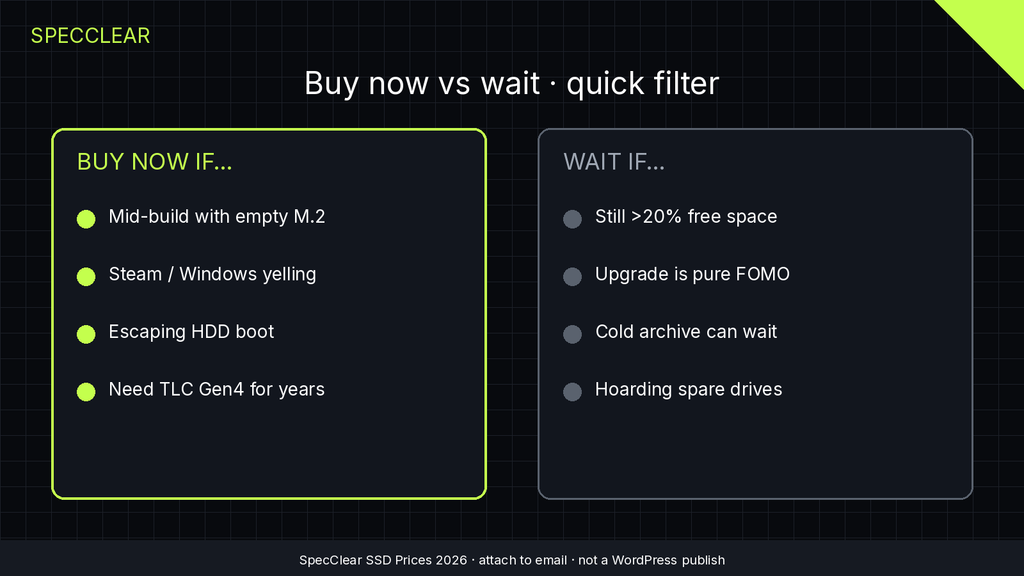
Buy now if…
Buy now when the PC problem is storage, not vibes.
- Your new build is mid-assembly and the only empty slot is the M.2 you refused to order.
- Windows or Steam is yelling about free space and you are already uninstalling games you still play.
- You are escaping an HDD boot drive. That upgrade still wins; it just costs more than it did last year.
- You need a known TLC Gen4 drive for a machine you will keep for years, and you are fine paying today’s price to stop thinking about it.
Buy the capacity you will use in the next year, not a fantasy archive, because stretching from 2TB to 4TB “just in case” at these prices is a bet, not a plan. Same rule as the RAM crunch: hedge with need, not with a shopping cart full of spare silicon.
Wait if…
Wait when your current SSD still has breathing room and nothing on your calendar forces a purchase.
- You sit above ~20% free space and you are not installing three 150GB titles next week.
- The “upgrade” is pure FOMO after reading another shortage thread.
- You can push a non-urgent media archive or cold store project past late 2027 without pain.
- You were about to “invest” in three spare drives for a shelf. That is hoarding. It helps the chart, not your frame time.
Waiting for a mythical Black Friday reset to 2024 pricing talks you into another quarter of higher stickers, while waiting because you do not need the space yet is discipline.
What to buy in this market
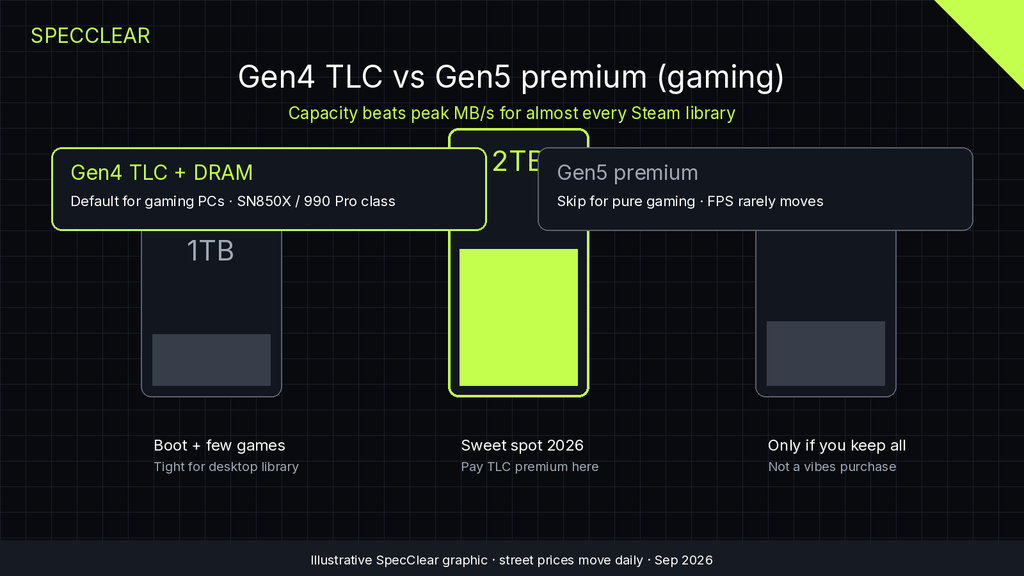
Default to PCIe Gen4 TLC with a DRAM cache for gaming and everyday desktop use, the value lane SpecClear already picks in Best SSD for Gaming in 2026. Capacity beats peak MB/s for almost every Steam library.
Skip the Gen5 tax if you mostly game, because load screens and asset streaming do not pay you back for the premium the way a GPU upgrade does. SpecClear’s PCIe 5.0 vs 4.0 gaming take and the Samsung 9100 Pro review both land the same place: blistering sequential speeds look great on a box, and they rarely move FPS.
Capacity guidance when money hurts:
- 1TB: fine as a boot-plus-few-games drive or a laptop slot, but tight for a modern desktop library.
- 2TB: the sweet spot for most gaming PCs in 2026. Pay the TLC premium here if you can.
- 4TB: buy when you already know you keep everything installed, or you edit video locally. Do not buy 4TB to feel prepared.
QLC and DRAM-less, in plain language: QLC stores more bits per cell, so it is cheaper per TB and fine for game installs you write once and read often, while heavy repeated writes (constant scratch disks, endless recording dumps) expose slower sustained speeds once the fast cache fills. DRAM-less drives lean on your system’s RAM or a cheaper mapping scheme and can hitch more under messy multitasking. For a second game archive, QLC can be the sane compromise; for your only boot drive you want to keep five years, prefer TLC with DRAM when the price gap is not absurd.
Newegg is the SpecClear affiliate path when you are ready: look at proven Gen4 TLC like the WD Black SN850X 2TB or Samsung 990 Pro 2TB class listings, confirm the live sticker, and ignore the Gen5 halo SKUs unless you have a real transfer workload. As of this 22 September 2026 check, SN850X 2TB Newegg listings commonly sit near ~$320 to $340 and 990 Pro 2TB near ~$389, which still fits the broader ~$320 to $390 2TB TLC band above. Recheck before you click.
Living with smaller or expensive storage
You do not need one giant drive to feel rich, and a second SSD is how a lot of people survive this market without selling a kidney.
Keep Windows and your active five games on a solid Gen4 TLC boot drive, then park the long-tail library, recordings, and “I might replay that” installs on a cheaper second M.2 or even a SATA SSD if the board still has a free bay. SpecClear’s how to add a second SSD walkthrough is the boring, useful version: no Windows reinstall required if you are adding storage, not replacing the boot disk.
Steam’s uninstall-and-reinstall cycle sucks, but it is free, and a folder hygiene night (Downloads, old ISOs, duplicate shader caches) often frees a surprising chunk before you spend another inflated dollar per gigabyte. External USB SSDs help for cold archives; they are not a magic escape hatch when NAND is expensive everywhere.
Living small for six months beats screaming at a cart total because a forum thread told you to “stock up.”
If you do buy a second drive, label the folders like a grown-up: games on D:, recordings on E:, junk in Downloads deleted on Sunday. The shortage does not invent new discipline; it just makes old habits more expensive when you ignore them.
The hard limit
This article cannot promise SSD prices will fall in 2026, and buying capacity you do not need will not make them fall either. If your drive is full and the build is real, pay today’s price for the TB you will use. If you are fine for space, keep your money.
Verdict
Buy now for the storage your active PC or in-progress build actually lacks: Gen4 TLC, usually 2TB, no Gen5 vanity tax for pure gaming. Wait only when free space is comfortable and the purchase is optional.
Cross-check live models in Best SSD for Gaming in 2026, skim PCIe 5 vs 4 before you overspend on bandwidth, and use second SSD tactics when one expensive stick of NAND has to do two jobs. The RAM side of the same crunch still lives at DDR5 shortage explained.
Shop Newegg when you are ready (Rakuten affiliate): confirm the SN850X 2TB / 990 Pro 2TB class price on the day you buy, and do not chase screenshots from last month.