
As an Amazon Associate I earn from qualifying purchases.
Thermal Grizzly launched the PhaseSheet PTM Pro around 3 to 4 November 2026, a phase-change thermal sheet that sits between a CPU or GPU and its cooler. It is solid at room temperature, turns into a very low-viscosity liquid above 45°C, and Thermal Grizzly says the new carrier film peels cleaner than the original PhaseSheet PTM so you are less likely to tear it. The 40 x 40mm sheet (MPN TG-PS-P-40-40) is listed at €19.90 / about $23 on Thermal Grizzly’s own shop. There is no verified US Amazon or Newegg listing for the Pro version as of 9 November 2026.
If you already know how to spread paste, the real question is not “is PTM magic.” It is whether the mess, longevity, and pump-out resistance are worth swapping your usual tube for a sheet.
This is a very welcome fix for anyone who’s always swapping coolers or CPUs, or who just likes keeping their PC spotless. PhaseSheet makes those jobs far more enjoyable. No more mess, no more hunting for that old tube of paste, no more grey fingers, and no more worrying about whether you put on too little or too much. Just understand that it won’t give you big temperature drops. It’s not a magic product that will knock 15 degrees off your current temps. Its real job is to make repasting quicker and cleaner while lasting a lot longer than paste. A true install and forget solution.
We have not tested PhaseSheet PTM Pro. Specs come from Thermal Grizzly’s datasheet (TGU20261102) and launch coverage from Tom’s Hardware and Overclock3D. The temperature deltas Thermal Grizzly published are vendor-lab numbers on a 30 x 30mm, 300N, 240W rig, not a third-party CPU or GPU review. Wait for independent tests before treating those charts as gospel.
The short answer
Switch to PhaseSheet PTM Pro (launched November 2026) if you are repasting a GPU, running a system for years between maintenance windows, or you hate cleaning baked paste off a die. Stick with a conventional paste such as Arctic MX-6 as a comparison baseline if you reseat coolers often, you want the cheapest first install, or you are not ready to pay ~$23 for a single 40mm sheet. Look at a carbon nanotube pad such as the Noctua NT-CP1 (2026, AM4/AM5 cut) if you want a true set-and-forget pad on an AMD desktop CPU and you accept a single-use install.
What PhaseSheet PTM Pro actually is
Phase-change material (PCM) sheets behave like a pad when cold and like paste when hot. Thermal Grizzly’s datasheet lists:
- Size: 40 x 40mm, 0.2mm thick
- Color: gray
- Density: 2.6 g/cm³
- Phase change: about 45°C
- Operating range: -40°C to +125°C
- Electrically conductive: no
- Item: TG-PS-P-40-40, EAN 4260711994661
Peak conductivity is said to develop and stabilize after about ten thermal cycles that each exceed 60°C. Optimal spread wants roughly 300 to 400N of mounting force. In the liquid state the material stays very low viscosity, then contracts as it solidifies again, which is how Thermal Grizzly argues it resists the pump-out effect that slowly squeezes paste out from between a copper cooler and a silicon die.
That last point is why PTM sheets show up so often in GPU and laptop service guides. Desktop CPU coolers with a thick IHS and paste still work fine for most people. Direct-die and GPU dies punish paste harder over time.
How it compares to paste
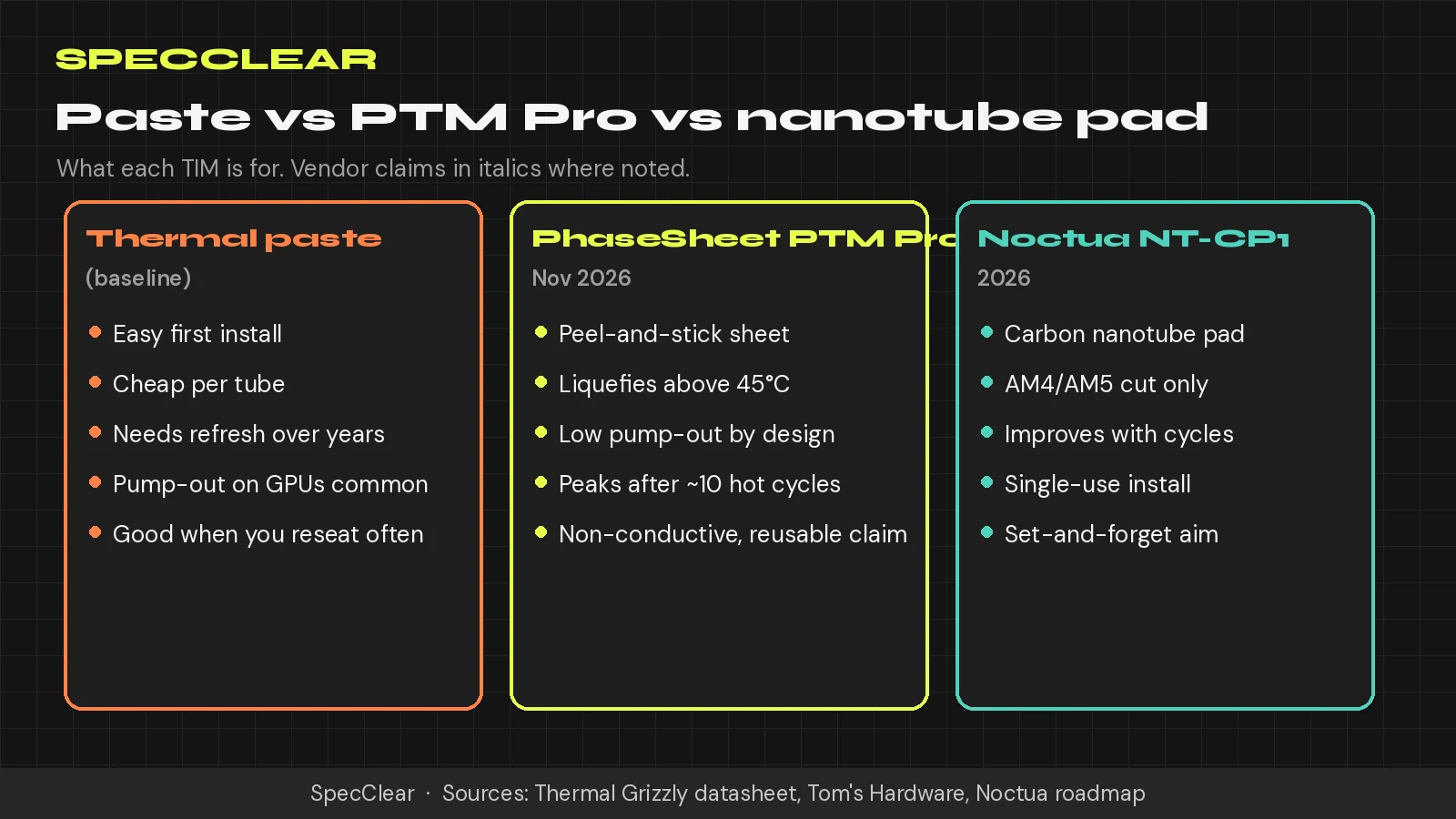
A good modern paste such as Arctic MX-6 is still the default for a reason. It is cheap, easy to portion, and forgiving when you remount a cooler next month. MX-6 itself is an older product, so we are not recommending it as a 2025/2026 “new pick.” It is the baseline almost everyone still uses, including in our own Black Friday add-ons list as a cheap insurance tube when you reseat a cooler.
Trade-offs versus PTM Pro:
- Install: paste wins for speed and “just put a pea on it.” PTM Pro wins for cleanliness if you follow the peel order and cut the sheet to fit.
- Early temps: paste is often at its best on day one. PTM Pro wants those conditioning cycles above 60°C before Thermal Grizzly says it hits its maximum.
- Longevity / pump-out: this is PTM Pro’s sales pitch, especially on GPUs. Paste can migrate; the sheet is designed to stay put.
- Cost: a multi-gram paste tube covers several mounts. PTM Pro is one 40mm sheet at about $23.
- Reuse: Thermal Grizzly calls PTM Pro reusable. Community experience with earlier PhaseSheet products is mixed once the material has heat-cycled into a waxier state, so plan as if a careful first install is the goal and treat reuse as a bonus, not a promise.
Thermal Grizzly’s own chart put PTM Pro ahead of KryoSheet, Duronaut Pro, and the original PhaseSheet PTM on that controlled 240W rig (5.83°C delta versus 6.13 / 6.29 / 6.36°C). That is a marketing chart until reviewers like Igor’s Lab or similar run it on real CPUs and GPUs.
How it compares to graphene / carbon pads
Graphene pads (Thermal Grizzly KryoSheet) and carbon nanotube pads (Noctua NT-CP1 with Carbice) are a different family. They stay solid. They aim for long or effectively maintenance-free life. KryoSheet is electrically conductive, which makes some builders nervous on bare dies. PhaseSheet PTM Pro is electrically non-conductive, which is why Thermal Grizzly pushes it for GPUs, mobile CPUs, and other exposed chips.
The Noctua NT-CP1 (2026 launch window, originally targeted September 2026 / Q4 2026 on Noctua’s roadmap) is cut for AMD AM4 and AM5 IHS footprints. It is a strong “install once” option for AMD desktop builders who want something that improves with cycles rather than drying out. It is single-use in practice because remounting damages the nanotube structure. It is not a GPU pad and it is not for Intel sockets at launch. Read our NT-CP1 explainer before you pick it over a PTM sheet.
Simple rule of thumb: PTM Pro for GPUs and mixed CPU/GPU service work where non-conductive matters. NT-CP1 for an AMD desktop CPU you plan to leave alone. Paste when you want cheap and reversible.
How to install PhaseSheet PTM Pro
This is the practical path Thermal Grizzly describes, merged with normal TIM common sense. Always follow your cooler and GPU board partner instructions if they conflict.
- Power down, cool down, unplug. Give the chip time to reach room temperature so the sheet stays solid while you handle it.
- Remove the cooler and clean the old TIM completely. Isopropyl alcohol and lint-free wipes are the usual approach. For GPUs, also mind pads on VRAM and VRMs; PTM Pro replaces the die TIM, not every pad on the board. Our GPU repaste guide covers the teardown mindset.
- Dry-fit the sheet. 40 x 40mm covers many desktop CPU IHS areas and plenty of GPU dies, but trim with clean scissors if your die is smaller. Do not stack sheets.
- Peel both carrier films. Thermal Grizzly redesigned the film so both sides release more easily. Support the sheet; do not stretch it.
- Place it centered on the IHS or die. No rubbing alcohol “wetting,” no extra paste on top.
- Mount the cooler straight down with even pressure. Datasheet target is roughly 300 to 400N. Cross-pattern screws on CPU coolers; factory torque pattern on GPU water blocks or air coolers.
- Condition it. Run workloads that push the chip past 60°C about ten times so the material can fully wet the surfaces. Expect the best numbers after that, not after the first POST.
If you are doing a CPU-only paste job for the first time, our CPU thermal paste guide is still the right primer for mounting pressure and cooler seating, even if you then choose a sheet instead of a tube.
Who should switch
Good candidates
- GPU repastes and water-block swaps where paste pump-out has burned you before
- Systems that stay on for years between cleanings
- Builders who want non-conductive TIM on a bare die
- Anyone who already liked the original PhaseSheet PTM and wants the easier film plus the claimed conductivity bump
Stay on paste (baseline) if
- You remount coolers constantly while testing
- You need several mounts out of one purchase
- You are uncomfortable trimming a sheet over a small die
- You want day-one peak temps without a conditioning period
Pick NT-CP1 instead if
- You are on AM4 or AM5, installing once, and longevity matters more than GPU duty
Where to buy
PhaseSheet PTM Pro is sold on Thermal Grizzly’s webshop at €19.90 (about $23; TG also shows $23.28 on some storefront views). US Amazon and Newegg pages for the Pro SKU were not verified at publish time, so we are not attaching a fake ASIN. When a US listing appears, check the MPN TG-PS-P-40-40 / EAN 4260711994661.
- Thermal Grizzly official shop (search PhaseSheet PTM Pro)
- Comparison baseline only (older product, not a 2025/2026 recommendation): Arctic MX-6 (4 g) on Amazon
If you are already ordering case fans or other small parts for Black Friday, keep the paste tube in mind as a spare, not as the hero product of this article. See the add-ons section in our Black Friday 2026 PC parts guide.
Verdict
PhaseSheet PTM Pro is a smart 2026 TIM option for GPU work and long-maintenance CPUs, not a mandatory upgrade for every build. The easier carrier film is a real usability fix. Do not expect big temperature drops from a TIM swap alone, and the conductivity claims still need third-party confirmation. If your cooler comes off every other weekend, paste is still saner. If you want to close a GPU and forget the TIM for a long stretch, this is exactly the product category you should be watching.