
SpecClear earns a commission if you buy through Newegg links on this page, at no extra cost to you.
Most builders spend weeks choosing a CPU and GPU and grab whatever fans come bundled with their case without a second thought. Then they wonder why their GPU runs hot under sustained load or why the PC is louder than it should be at gaming speeds.


Case fans are the cheapest upgrade with the largest acoustic and thermal impact relative to cost. A quality set of 120mm or 140mm fans runs $15-$35 each. The difference in noise between a good fan and a mediocre one at 800 RPM is audible. The difference in temperatures between adequate airflow and optimised airflow is 5-15°C on the GPU, which directly affects whether a high-TDP card sustains peak boost clocks during extended gaming sessions.
This guide covers exactly which fans to buy for every use case, airflow, silence, radiators, RGB builds, and budget builds, with specific numbers and specific products, not vague recommendations. Placement is a separate question, which our guide to case fan airflow answers.
The Metric That Matters Most for Your Use Case
Before picking any fan, understand which specification matters for where you’re mounting it.
CFM (Cubic Feet per Minute) measures volume of air moved in open space. High CFM is what you want for front intake fans on a mesh-front case, rear exhaust fans, and top exhaust positions, anywhere the fan is moving air relatively freely without resistance.
Static Pressure (mmH2O) measures how much force a fan can push air through resistance. High static pressure is what you want for radiator mounts, heatsink mounts, and any position with a filter or obstruction between the fan and the airspace it’s moving air through. A high-CFM, low-static-pressure fan drops significantly in effective airflow when mounted against a radiator’s dense fin stack, you need pressure to push through it.
The practical rule: front case fans and exhaust fans, prioritise CFM. Radiator fans and heatsink fans, prioritise static pressure.
Noise (dBA) is logarithmic. A fan producing 25 dBA at 1000 RPM and one producing 30 dBA at the same speed are not slightly different, 30 dBA is perceived as roughly twice as loud. At under 25 dBA at gaming loads, a fan is effectively inaudible at normal viewing distance. Above 35 dBA, it’s clearly audible. Above 40 dBA at sustained gaming speed, it’s the loudest thing in the system.
Bearing type determines how long the fan lasts and how it sounds at low speeds. Fluid Dynamic Bearings (FDB) are what you want, quieter, run cooler, last longer than sleeve bearings. Noctua’s SSO2 is a magnetic-stabilised FDB variant that’s friction-free at low RPM and is effectively the bearing quality benchmark. Magnetic levitation bearings, found in Corsair’s RS120 and QX series, achieve near-zero friction through magnetic fields rather than physical contact. Both are excellent. Sleeve bearings are the budget option, functional but louder over time and shorter-lived.
The Fans Worth Buying
Best Overall 120mm: Noctua NF-A12x25 G2 (~$34 on Newegg)
The Noctua NF-A12x25 G2 is the top pick for silence-optimised fans because it delivers huge amounts of airflow while running at low RPMs. The G2 is the second generation of what was already the benchmark 120mm fan, a complete redesign of the blade geometry, motor, and frame compared to the original NF-A12x25. Newegg carries the Noctua NF-A12x25 G2 if you want to compare prices.

Specific numbers: 102.1 CFM at maximum RPM, 2.34 mmH2O static pressure, rated at 1850 RPM maximum. At 1000 RPM, a typical gaming load fan speed, it runs at around 18-20 dBA. That’s below the threshold most people can hear at normal desk distance.
The SSO2 bearing gives it a 150,000-hour rated lifespan. Six-year warranty from Noctua. The brown colour is the only legitimate complaint, it stands out inside glass-panel builds that use a different colour scheme. Noctua sells a Chromax.Black version for $5-8 more for builders who need it to disappear into a dark interior.
Buy this if: acoustic performance is the priority, you’re building a near-silent workstation or gaming PC, or you want the fan you install once and never think about again.
Don’t buy five of them: five NF-A12x25 G2 fans runs $175 before you’ve bought anything else. The Arctic P12 Pro at a fraction of the price covers 80% of the performance across the same fan count.
Best Budget 120mm: Arctic P12 Pro (~$8-$12 per fan, 5-pack ~$31 on Newegg)
The Arctic P12 Pro is the new and improved budget champion, offering higher airflow rating, static pressure, and RPM than its predecessor the Arctic P12 PST PWM, while remaining extremely affordable, five fans for as little as $18 in some deals. Deal prices change often, so check the Arctic P12 Pro listing before you buy.

At standard retail pricing the P12 Pro 5-pack runs around $39-$44 on Newegg. That’s under $9 per fan for a fluid dynamic bearing, 77 CFM, 2.2 mmH2O static pressure, 2000 RPM capable fan. Nothing else at this price competes with it on pure value.
The P12 Pro’s “P” designation means it’s pressure-optimised, well-suited for both case positions and radiator mounts. At 1000 RPM gaming speeds, noise is around 20-22 dBA, audible in a quiet room, inaudible during game audio. The Arctic P12 Pro has proven reliable across millions of builds and carries solid brand support.
Buy this if: you’re equipping a full case with 5-6 fans and can’t justify Noctua prices, you want to upgrade from bundled fans without spending serious money, or you’re building a secondary PC where acoustic perfection isn’t the goal.
The ARGB version of the P12 Pro adds RGB at slightly higher cost, worth it if your motherboard has an ARGB header and you want the lighting without paying Corsair or be quiet! prices.
Best for Radiators: Corsair RS120 (~$15-25 per fan, 3-pack ~$29 on Newegg)
The RS120 is what Corsair bundles with their own AIO coolers and cases for good reason. Static pressure is its headline number: 72.8 CFM at 2100 RPM with 4.15mm H2O of static pressure, the highest static pressure in most fan comparison lineups, making these fans exceptionally well-suited for thick radiators and heavily restricted airflow paths. For radiator duty, our pick is the Corsair RS120.

At 4.15 mmH2O, the RS120 pushes air through dense radiator fin stacks more effectively than Noctua or Arctic equivalents. If your build’s primary concern is extracting maximum performance from a 360mm AIO cooler, the RS120 is the correct fan for the radiator positions.
The daisy-chain system lets you connect all three fans in a 3-pack together and run them from a single motherboard header. The connectors click together securely. For a 360mm AIO with three 120mm fans, that’s one header connection instead of three.
The trade-off is noise at high speeds. At maximum 2100 RPM the RS120 produces around 30-32 dBA, audible but not harsh. During gaming where the fan is running at 60-70% speed, it’s comfortable. Under sustained stress-test loads where it ramps to maximum, it’s clearly present.
Buy this if: your primary use case is pushing air through a radiator and you want maximum thermal performance from that position. Don’t buy it as a general-purpose case fan where the static pressure advantage doesn’t apply, the Noctua or Arctic options are better matched for open-air intake positions.
Quietest Operation: be quiet! Silent Wings 4 140mm (~$24 on Newegg)
If the PC needs to be genuinely quiet, a home office build, a bedroom PC, a hybrid work-and-gaming system, the be quiet! Silent Wings 4 is the answer. The 140mm version specifically: the Silent Wings 4 offers the best performance-to-noise ratio in 2026 at low operating speeds, with the 140mm variant moving meaningful airflow nearly inaudibly below 1000 RPM. For a quiet build, buy the be quiet! Silent Wings 4 140mm.

At 800 RPM the Silent Wings 4 140mm produces around 10-13 dBA. At normal desk distances and with any ambient room noise, that’s effectively silent. It produces 83.7 CFM at max speed, strong for a 140mm fan, but the value at low speeds is the point. A system that never needs fans above 50% speed to maintain safe temperatures because the 140mm fans move enough volume at low RPM is acoustically distinct from a system relying on 120mm fans running faster.
Buy two for front intake and one for rear exhaust on any build where silence is explicitly the goal. The 120mm version also exists at slightly lower prices for cases that don’t support 140mm in all positions.
The price per fan is higher than Arctic but lower than Noctua, the Silent Wings 4 sits in the value-conscious premium tier.
Best RGB: Corsair iCUE LINK LX120 RGB (~$30-35 per fan, 3-pack with hub ~$99)
RGB case fans in 2026 either look great or cool well, rarely both. The Corsair iCUE LINK LX120 is the exception. The LX120 uses magnetic levitation bearings, near-zero friction, extremely quiet at gaming speeds, and its 34 individually addressable ARGB LEDs produce exceptionally even, full-bleed lighting that doesn’t show hot spots or dark edges between LEDs. Daisy-chains connect up to six fans from a single USB header to the iCUE LINK system hub. If you already use iCUE, go with the Corsair iCUE LINK LX120 RGB.

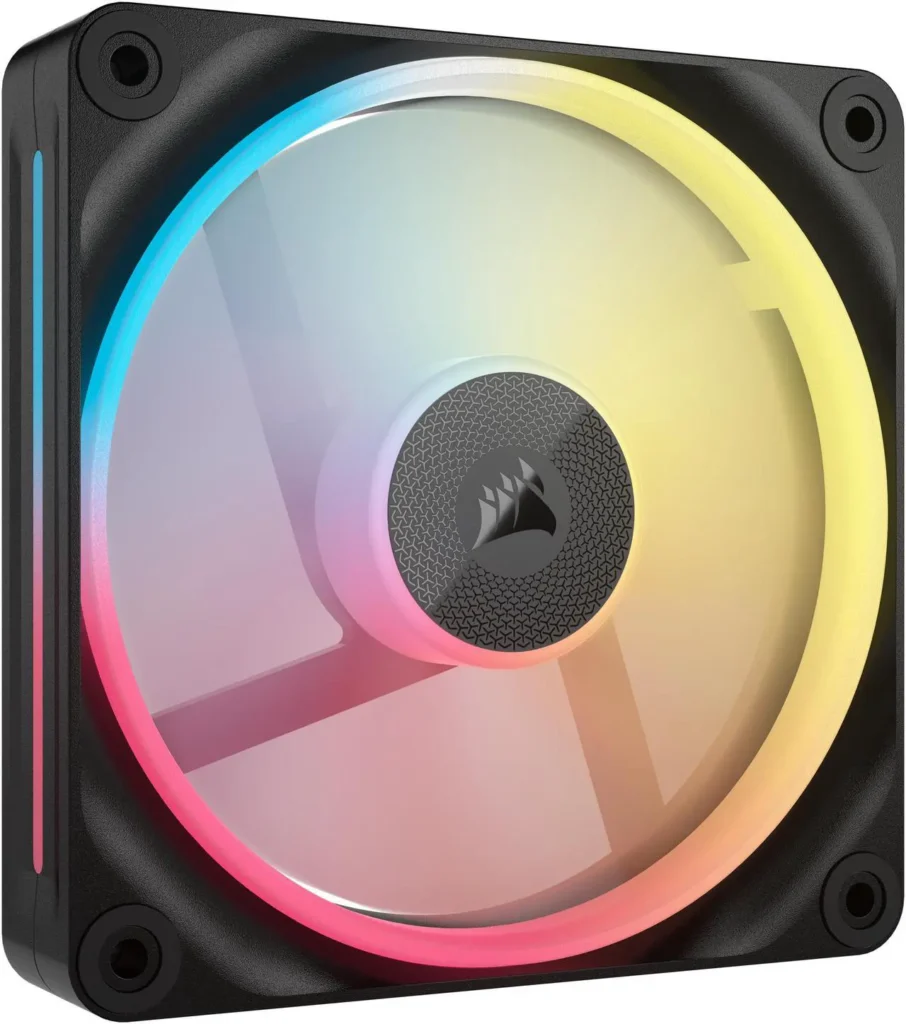
The iCUE ecosystem is the consideration. If you want the LX120’s lighting capabilities, you need an iCUE LINK hub ($30-$40 if not included) and Corsair’s iCUE software. The software is stable and comprehensive, fan curves, lighting effects, temperature monitoring all in one place. If you already have a Corsair build with iCUE, the LX120 is the natural choice. If you’re not in the Corsair ecosystem, the software commitment is worth considering before buying.
Alternative: the be quiet! Light Wings LX RGB achieves similar visual quality through a different frame design and integrates with multiple motherboard RGB platforms without a proprietary hub. If motherboard RGB sync matters more than Corsair iCUE integration, the Light Wings LX is the right choice.
New at Computex 2026: Worth Watching
Computex 2026 brought several innovative fan concepts including the Arctic Bionix P12 and P14 ARGB line that daisy-chain to each other via a small PCB between frames forwarding both ARGB and PWM signals across up to five fans, and the Cooler Master MasterFrame A with full aluminium frame and blades. Tom’s Hardware is currently gathering these fans for testing. Check their page for updated recommendations once reviews land.
The Hyte THICC FR12 Trio RGB with its frosted RGB element between fans also showed at Computex, promising for RGB enthusiasts who want diffused lighting without hot spots. No independent reviews are out yet.
The Quick Decision Guide
Pure airflow, budget: Arctic P12 Pro 5-pack at ~$31. Equip a full case for under $40. Check the price of the Arctic P12 Pro.
Pure airflow, premium: Noctua NF-A12x25 G2 at $34 each. Best-in-class acoustics and longevity. Check the price of the Noctua NF-A12x25 G2.
Radiator fans: Corsair RS120 3-pack at ~$39. Highest static pressure in the segment. Check the price of the Corsair RS120.
Silent build: be quiet! Silent Wings 4 140mm at ~$24 each. Near-inaudible below 1000 RPM. Check the price of the be quiet! Silent Wings 4 140mm.
RGB build: Corsair iCUE LINK LX120 3-pack with hub. Best lighting in the category if you’re in the iCUE ecosystem. Check the price of the Corsair iCUE LINK LX120 RGB.
White build: Arctic P14 PWM White 3-pack or Lian Li UNI FAN TL 140 White, both available on Newegg, both with clean white frames that won’t yellow.
One rule that covers every scenario: don’t buy fans with sleeve bearings. Every quality brand names their bearing type in the spec sheet. If a fan doesn’t specify its bearing, it’s using a sleeve bearing. Spend the extra $3-5 per fan on a fluid dynamic or magnetic bearing unit. You’ll hear the difference in 18 months.