
SpecClear earns a commission if you buy through Newegg links on this page, at no extra cost to you.
The most common fish tank case fan setup mistake is treating the glass corner like a mesh front and hoping the fans sort it out. They won’t. A panoramic case has no front intake at all, so every degree you save comes from pointing the side, bottom, top and rear fans the right way and balancing them against each other.
Airflow matters a lot in normal cases, but in fish tank cases it matters even more because of the design constraints. Manufacturers usually make up for those limits by adding alternative intakes and exhausts, and using them well is the key to getting great cooling out of these cases.
Last checked: 29 September 2026. Newegg prices below move daily, so treat them as a snapshot.
Why fish tank cases don’t cool like a mesh-front tower
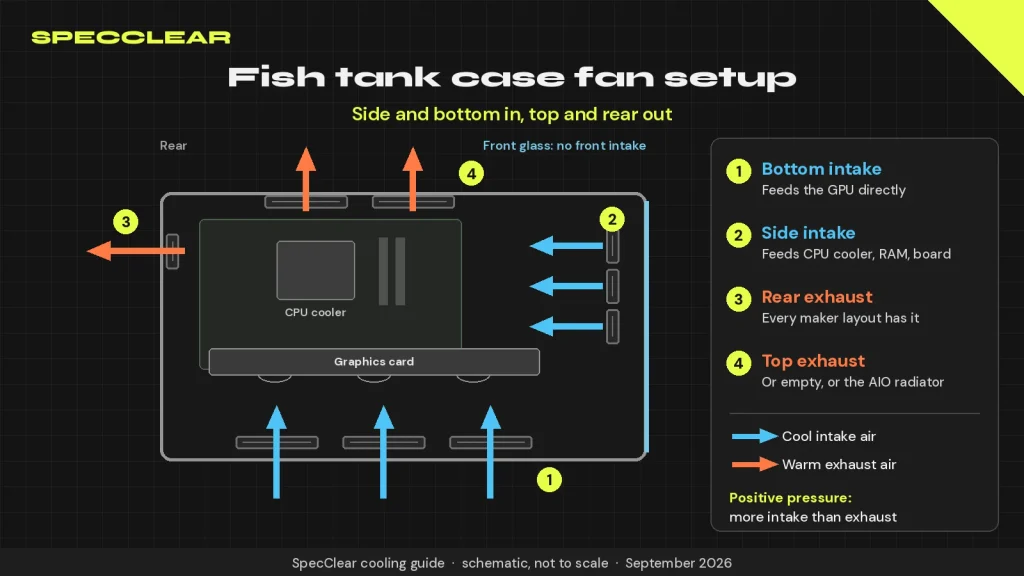
A classic mid-tower pulls air through a mesh front and pushes it out the back, which is the layout our fan airflow guide for standard mesh-front cases covers. Fish tank cases swap that mesh for glass and move the fans to the side panel next to the motherboard and to the floor under the graphics card. That’s why our case design guide treats dual-chamber cases as their own category.
PC Gamer’s January 2026 fish tank roundup says these cases “are not known for their amazing airflow,” and the reason is simple. Air has to enter across the width of the case or straight up from the floor, and the graphics card sits in the middle of that path like a shelf.
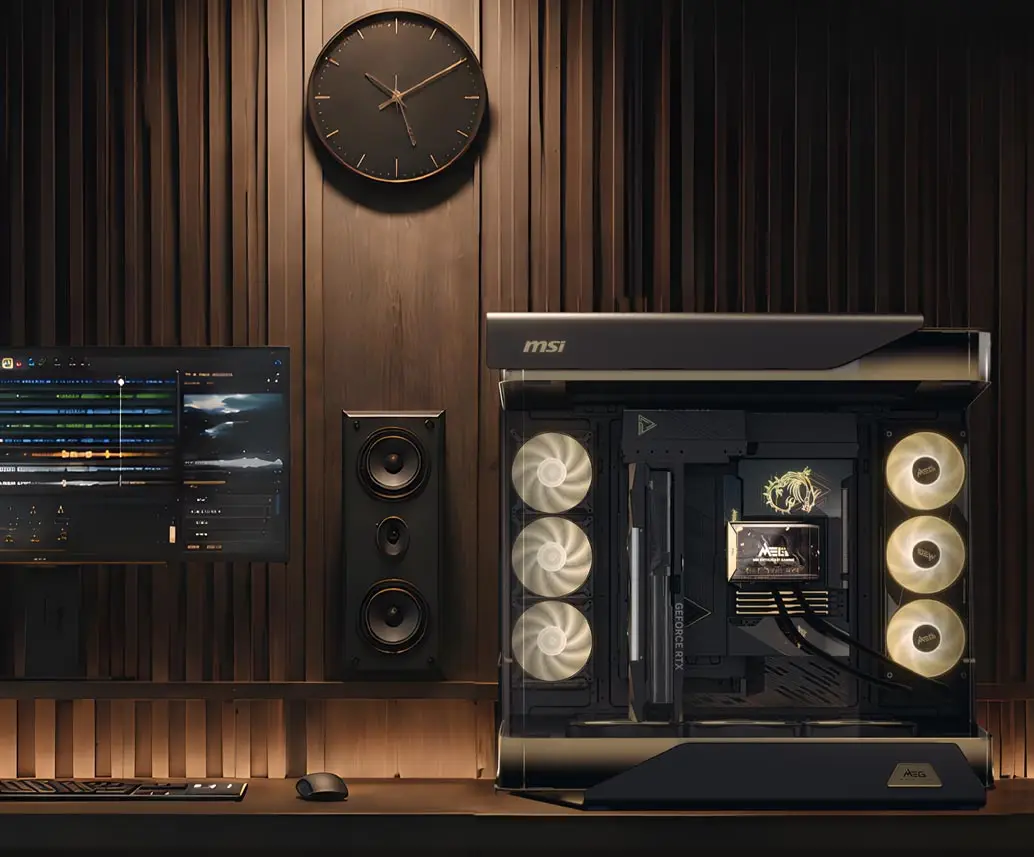
Small design details matter a lot here. When Tom’s Hardware tested the APNX V1, whose intake fans are angled toward the components, it ran 9°C cooler on the CPU and 5°C cooler on the GPU than MSI’s Maestro 700L PZ in its simulated gaming load.
The layout that works: side and bottom in, top and rear out
Almost every manufacturer lands on the same default. Corsair’s configuration guides for its glass-fronted 3500X and 6500X set the side and bottom fans as intake and the rear and top fans as exhaust, and NZXT’s tested H6 layouts use the same intake positions. Cool air comes in low and from the side, the GPU and CPU heat it, and it leaves through the roof and back where warm air wants to go anyway.
- Bottom fans: intake. They feed the GPU directly, and Phanteks calls the NV5 MK2’s bottom slot a dedicated GPU fan for exactly that reason.
- Side fans: intake. They feed the CPU cooler, RAM and motherboard.
- Rear fan: exhaust. It’s in every manufacturer layout we checked.
- Top fans: exhaust, or empty. More fans up there isn’t automatically better, as NZXT’s testing shows below.
Reverse-blade fans: better looks, same airflow

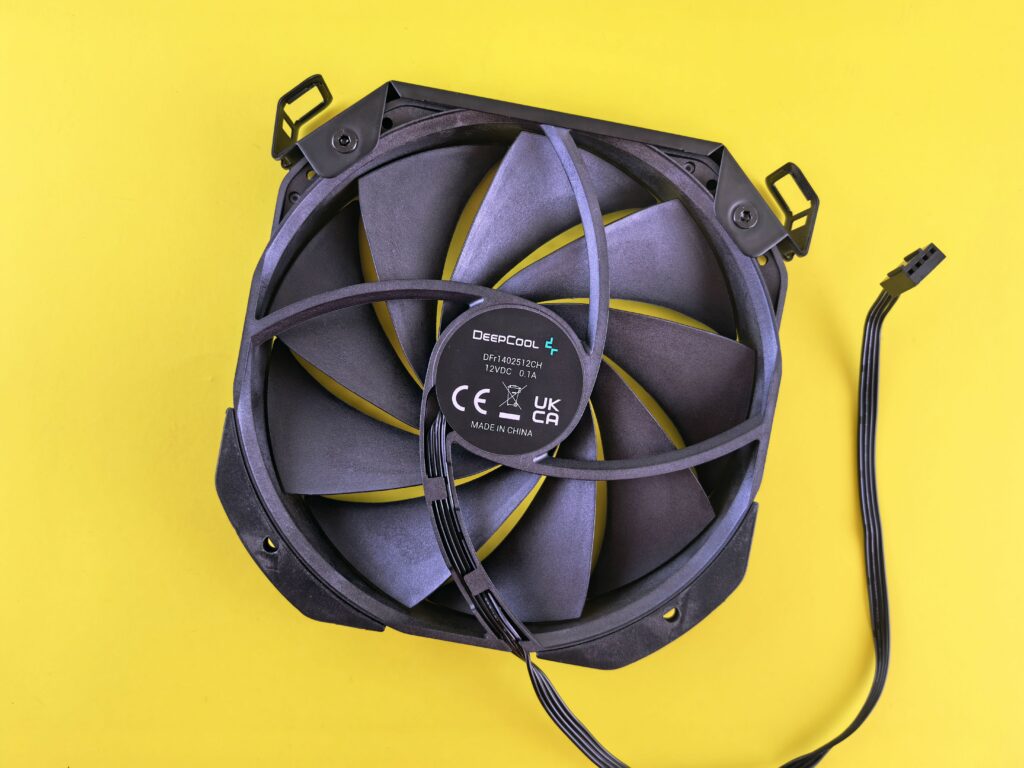
A normal fan pulls air in through its clean face and pushes it out the side with the motor struts. Mount one as a side or bottom intake and you’re staring at the strut side through the glass. Reverse-blade fans flip the blade angle so the lit, clean face points at you while the fan still blows into the case.
That’s all they do, so the reason to buy them is how the build looks. NZXT’s own pitch for the F360 RGB Reverse is “Same cooling. Same RGB. Cleaner face.” A regular fan mounted the other way round moves air in exactly the same direction, although Overclockers UK notes some reverse models give up a little airflow or static pressure against their standard twins, so compare spec sheets.
Don’t spend money on reverse fans for positions you can’t see. Top and rear exhausts already show their clean face into the case, so standard fans are the right buy there.
Bottom intake and the GPU recirculation problem
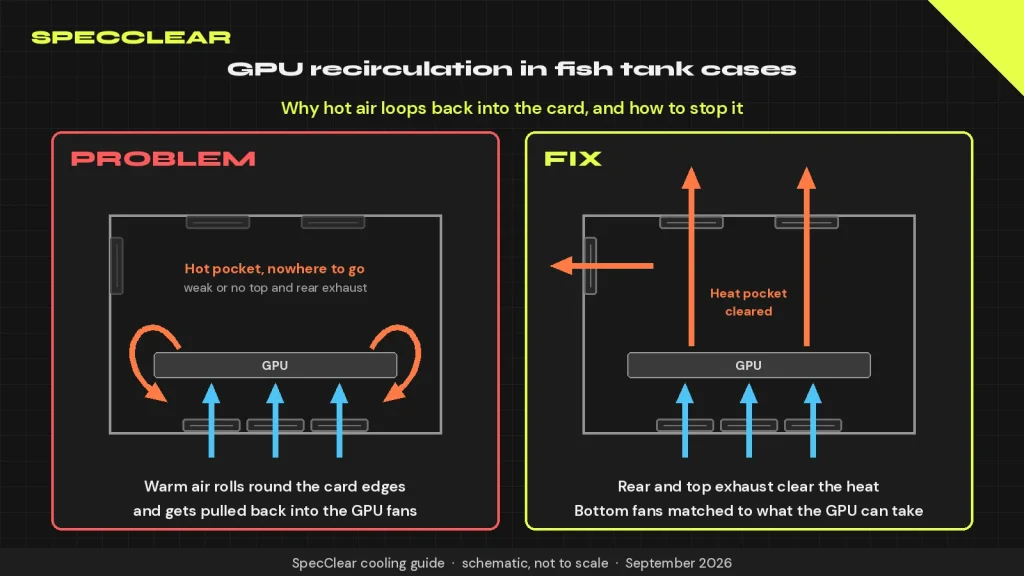
This is the one that catches people. An open-air graphics card pulls air up from below and dumps heat around the sides and top of its heatsink, and in a fish tank case that card is a wide horizontal wall. If the space above it isn’t cleared fast enough, warm air rolls around the card’s edges and gets pulled straight back into the GPU fans. Mounting the card vertically changes the picture again, and our vertical GPU mount guide covers what that does to temperatures.
Phanteks takes it seriously enough that the EX6 Max seals the GPU chamber with a rubber gasket to minimise hot air recirculating from the top of the card to the bottom, a detail we flagged in our Phanteks EX5 and EX6 coverage and PC Gamer reported too. Your case almost certainly lacks that gasket.
The fix is more exhaust above the card rather than less intake below it. Keep the rear fan running, give the top some exhaust path, and don’t run the bottom fans flat out if the GPU’s own fans can’t swallow that much air. Flipping the bottom fans to exhaust doesn’t help either, because then they and the GPU fans are pulling opposite ways from the same pocket of air.
Where the AIO radiator goes in a fish tank case
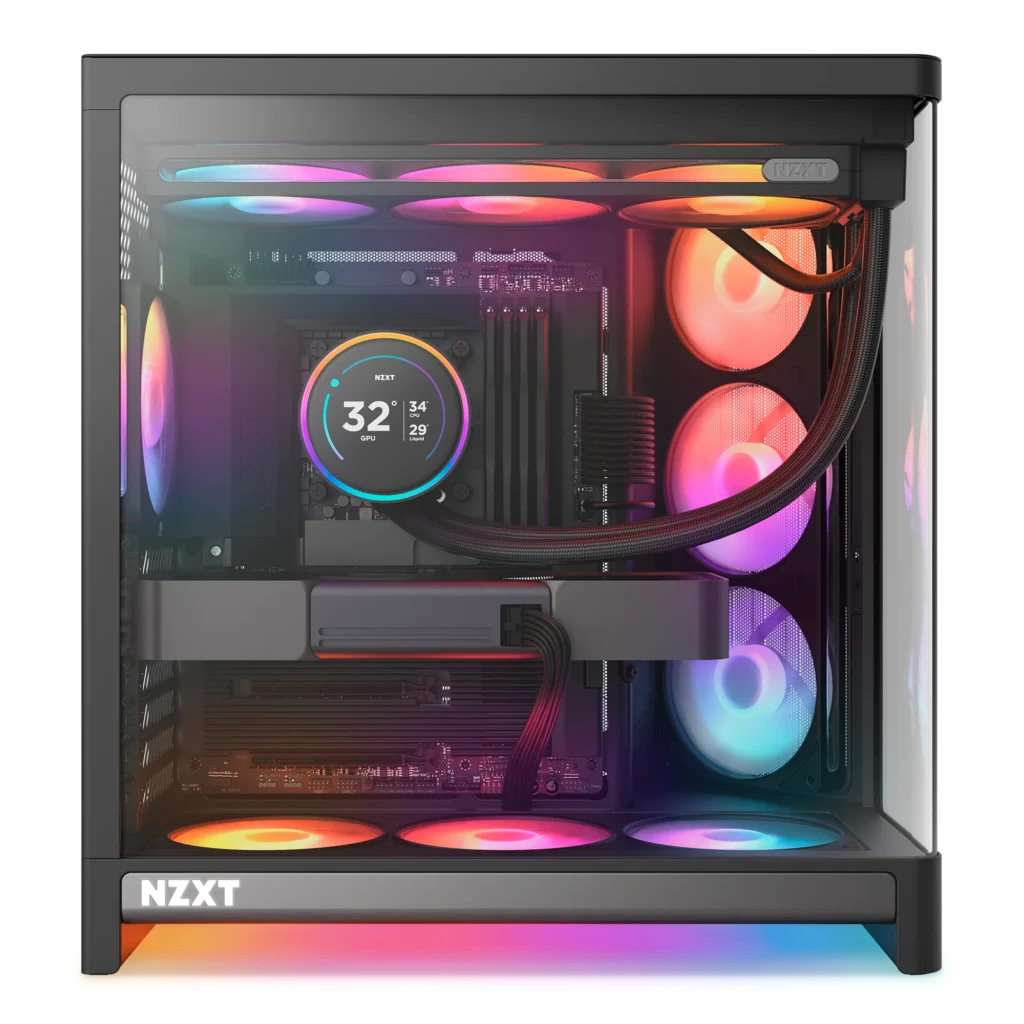
You’ve got two realistic spots. A top radiator as exhaust is NZXT’s recommended AIO layout for the H6, with side and bottom intake and a rear exhaust. The radiator breathes air the GPU has already warmed, but the GPU keeps the cool air from below, and in a gaming PC the graphics card is usually the bigger heat source.
A side radiator as intake is the other option, and in glass-roof cases like the Lian Li O11 Vision Compact in Vision mode it’s often the only one. Your CPU gets the coolest air in the room, but the radiator’s warm output now heads toward the GPU and memory. That works when bottom fans feed the GPU separately and there’s enough rear exhaust to clear it.
Either way, keep the pump from being the highest point in the loop, the rule AIO manuals repeat for good reason.
Positive pressure, dust and the filters you’ll actually clean
Positive pressure means your intakes move more air than your exhausts, so the leftover air leaks out through gaps instead of being sucked in. Corsair’s guide says this keeps dust from entering through unfiltered gaps and channels, and it matters more in a glass case, where dust shows up on every panel you paid to look at.
The fish tank layout already leans positive because you’ll usually have more intakes than exhausts. It only works if the intakes are filtered and those filters stay clean, and the bottom one clogs first when the PC sits on carpet.
How many fans you actually need
Fewer than you think. NZXT’s tested air-cooled H6 layout uses six fans: three side intakes, two bottom intakes and one rear exhaust, with nothing on top. Its note on that test is the most useful line on this topic, because it says extra top fans may pull fresh air away from a tower air cooler and raise CPU temperatures. Corsair calls its eight-fan 3500X layout “more than sufficient.”
For most fish tank builds, five to seven fans is the sweet spot: two or three side intakes, two or three bottom intakes, one rear exhaust, and top exhaust only when a radiator sits there or your temperatures prove you need it.
These were listed on Newegg when we checked on 29 September 2026:
- Phanteks NV5 MK2 ($99.99): the easiest cheap fish tank to set up right, thanks to that bottom GPU fan slot.
- NZXT H6 Flow RGB (about $100 to $106 in white): angled side intakes and a manufacturer-tested layout you can copy.
- Lian Li O11 Vision Compact ($124.99): the glass-roof pick, so plan on a side radiator.
- be quiet! Pure Wings 3 120mm Reverse 3-pack ($32.30 in white): the budget way to fill side or bottom intakes.
- NZXT F360 RGB Reverse ($49.99): three reverse fans on one frame, so you route one cable instead of three.
Test it in 20 minutes with HWiNFO and one game
You don’t need a lab. Open HWiNFO in sensors-only mode, reset the minimum and maximum values, and play the same demanding game in the same spot for 15 to 20 minutes with the side panel on. Note CPU temperature, GPU temperature, GPU hot spot, GPU memory junction if your card reports it, and room temperature.
Then change one thing, such as bottom fan speed, top exhaust on or off, or radiator direction, let the PC cool down and repeat the same run. Keep the change if the GPU hot spot drops and the CPU doesn’t climb. HWiNFO’s logging button saves a CSV if you’d rather compare files than scribbled notes.
To check a fan’s direction before you boot, find the two arrows moulded into the frame, or hold a strip of tissue near the grille and watch which way it moves.
Mistakes that cost you the most degrees
- Side or bottom fans set as exhaust by accident. It’s easy with reverse-blade fans, because the pretty side facing you no longer tells you which way air goes.
- Filling the top with exhaust on an air-cooled build. NZXT’s own testing is the warning.
- Bottom fans starved by carpet or a clogged filter. The GPU loses its best air supply without you noticing.
- A vertical GPU mounted tight against the glass. It chokes the card’s fans, and no case fan layout makes up for that.
No fan layout turns a glass box into a mesh-front case. If temperatures matter more than the view, buy the mesh version of the same chassis, which is exactly why we pointed buyers at the Airflow variant in our MSI Vixta 300R review. If the view is the point, study how MSI built the Maestro 900R around three 160mm reverse-blade bottom intakes feeding a bottom-to-top path, and copy that logic in whatever fish tank you own.
SpecClear participates in affiliate programmes. When you purchase through links on this site we may earn a commission at no additional cost to you.