
SpecClear earns a commission if you buy through Newegg links on this page, at no extra cost to you.
The Stream Deck sits on desks in every streamer setup photo you’ve ever seen online and it looks impressive. It has programmable LCD buttons that change based on what you’re doing. Everyone who owns one seems to love it. What’s less clear at least until you’ve used one, is what it actually does that a keyboard shortcut doesn’t, and whether the price is justified for someone who isn’t broadcasting to thousands of people every night.
What the Stream Deck is, what it does well, what it doesn’t, the model ladder, and whether it belongs on your desk.
What it actually is
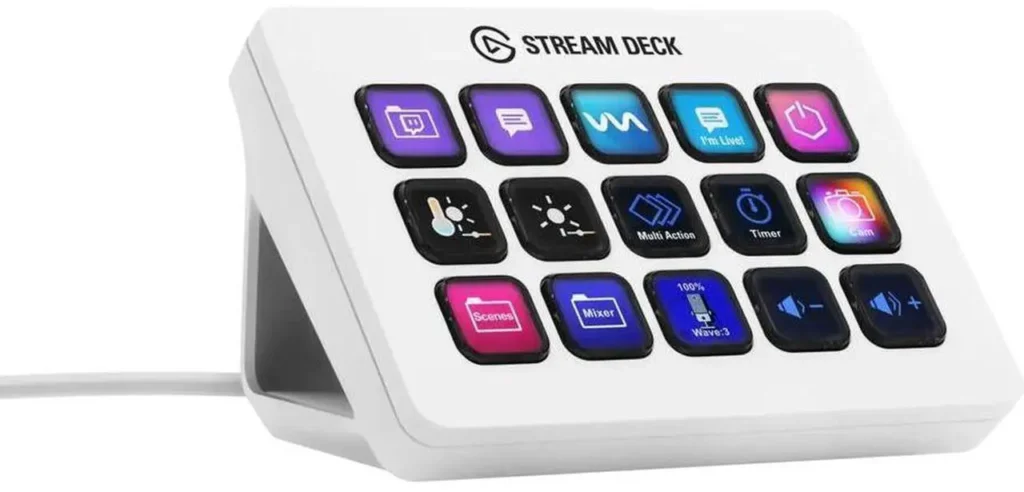
The Stream Deck is a USB peripheral with a grid of physical buttons; each button has an LCD screen behind it that displays a customisable icon. Press a button and it executes whatever action you’ve programmed to it, it could launch an application, trigger a keyboard shortcut, switch a scene in OBS, mute your microphone, adjust volume, post a message to chat, open a URL, run a macro. The actions are configured in Elgato’s free software and can change automatically based on which application is in focus at the time. if you’re using OBS, then all your OBS relevant options are displayed…. using premier pro, then all premier pro-options become available.

The core insight is that physical buttons with visual labels are faster and more reliable than keyboard shortcuts in a high-pressure live environment. When you’re mid-game and something goes wrong, your audio drops, a viewer asks you to switch cameras, a raid arrives, you don’t have to remember which key combination does what. You press the button with the picture of the thing you want and it just happens.
That use case is genuinely compelling for anyone who runs a live production. It is genuinely unnecessary for anyone who doesn’t though.
The model lineup
Elgato currently sells four models. The right one depends entirely on how many actions you need accessible at once. If you haven’t set up streaming software yet, start with our guide to setting up OBS.
Stream Deck Mini: 6 buttons, $71.99
Six buttons in a 2×3 grid. The right choice if you want to test whether a Stream Deck fits your workflow without a large investment. Limiting for serious setups, six actions disappear fast once you start adding scene switches, audio controls and application shortcuts.

Stream Deck MK.2: 15 buttons, $159
The original form factor. 5×3 grid. This is the one most people should buy if they’ve decided the Stream Deck is for them. 15 buttons are enough for a complete OBS layout, audio controls, Discord management and a handful of application shortcuts without needing to page between folders. Includes a removable faceplate for aesthetic customisation.

Stream Deck XL: 32 buttons, $262.99
For professional broadcasters, live event production, or people running complex multi-application workflows. 32 buttons are a lot. If you need to page between folders on the 15-button model constantly, the XL solves that. If you don’t, it’s a large expensive device taking up desk space. That model is the Elgato Stream Deck XL ($262).

Stream Deck +: 8 buttons plus 4 dials, $199.99
The newer variant that adds rotary dials alongside the standard buttons. The dials control continuous values, volume, brightness, playback speed, with a satisfying tactile feel. For audio production and video editing it’s genuinely the best option. For pure streaming and gaming use the MK.2 is more versatile per dollar. Stream Deck + ($149)

What it does genuinely well
Scene switching in OBS is the primary use case and it’s where the Stream Deck earns its price immediately for streamers. Switching from a game scene to a face-cam-only scene to a brb screen without tabbing out or hitting keyboard combos’ mid-game is a real quality-of-life improvement. The visual labels eliminate the cognitive load of memorising hotkeys during a live broadcast. For other recent streaming and desk gear, see our Computex 2026 peripherals roundup.
Audio mixing on the fly. The Stream Deck integrates with audio applications to adjust individual source volumes without touching the mouse. Ducking music when you want to talk, unmuting a guest, adjusting game audio when Discord notifications are loud, these become one-button actions instead of mouse-driven operations across multiple windows.
System control for a complex setup. Multiple monitors, multiple audio devices, different applications that each need different lighting profiles, the Stream Deck can control all of these from a single panel. A single button press that launches OBS, sets your desk lamp to broadcast mode, switches your audio output to your headset and starts a stream timer is a legitimate example of what it can do. For most setups, the Elgato Stream Deck MK.2 is enough.
The software. Elgato’s Stream Deck software is free, well-maintained, and integrates with an enormous ecosystem of third-party applications. Spotify, Philips Hue, IFTTT, Twitch, YouTube, Discord, Slack, Adobe Premiere, DaVinci Resolve, the plugin library covers most things a creative professional or streamer uses daily.
What it doesn’t do well
It does not replace a keyboard. Keyboard shortcuts for in-game actions, typing, standard desktop navigation, none of this benefit from a Stream Deck. The device is for production and workflow, not for gaming inputs. For the rest of a streaming setup, see our streaming and content creator setup guide.

The software requires it to be running. If the Stream Deck software isn’t open, the buttons either do nothing or revert to basic keyboard shortcuts. On a machine where resources matter, this is another background process that adds more strain.
It won’t fix a disorganised workflow. The Stream Deck is an accelerator for a workflow that already exists. Setting it up requires deciding what your workflow actually is, mapping it thoughtfully, and maintaining that map as your setup changes. People who buy one and plug it in expecting it to make them better at streaming without putting in the configuration work will find it sits idle. so, if your process is not in place yet you should start with that first… this isn’t going to create your workflow for you.
For gaming specifically: without streaming
This is the honest part. If you’re a PC gamer who doesn’t stream, cast or produce any kind of content, the Stream Deck probably isn’t for you. The use cases narrow significantly. You can use it for in-game macros, but most games either support macros natively or prohibit them in competitive play. You can use it to control RGB lighting profiles or switch audio devices. These are nice but not $150 nice.

The exception is if your gaming setup is genuinely complex, multi-monitor with different input sources, audio switching between speakers and headset, scene transitions for a capture card, Discord management during group play. In that case, the Stream Deck MK.2 at $149.99 will earn its price in reduced friction within a week. of course, the inverse is also true… there is no need to over complicate your gaming session just to justify having a stream deck on your desk.
Competitors worth knowing
Elgato dominates this category but doesn’t own it entirely.
The Loupe deck Live is a direct competitor with physical dials alongside buttons, aimed more at content creators and photographers. Better for colour grading and audio production, comparable for streaming, more expensive.
The Razer Stream Controller is Razer’s entry into the space. Similar button grid, integrated dial, works with Razer Synapse. Worth considering if you’re already in the Razer ecosystem, though Elgato’s software integration is wider.

For budget-conscious buyers, third-party Stream Deck alternatives exist, the Ajazz APC40 and similar products offer comparable functionality at lower prices with varying levels of software support. The trade-off is always the software ecosystem. Elgato’s plugin library is the product’s real value, and cheaper alternatives can’t match it.
The verdict
Buy the Stream Deck MK.2 if you stream, cast, produce video content, or run a complex multi-application workflow that currently costs you time and attention. The 15-button layout is the right balance of capability and desk footprint. The software genuinely works and keeps improving.
Don’t buy it if you’re a pure gamer who doesn’t broadcast. The use cases don’t justify the price. Spend that $150 on something that affects frame rates. If you do stream from a complex setup, the Elgato Stream Deck XL gives you 32 keys.