
ASUS just put two very different external GPU products on the table in the same week: the ROG XG Station 3, a Thunderbolt 5 dock that takes a full desktop graphics card (announced 3 November 2026), and the XG Core, a compact USB4 box with a Radeon RX 9060 XT LP 16GB already inside (announced 6 November 2026). Same company, same “plug a GPU into a thin device” pitch, totally different buyer.
Neither product has a US price or ship date as of 9 November 2026. Treat this as a who-it’s-for explainer, not a buy guide with street prices.
These docks can give a compatible handheld or thin laptop a serious gaming upgrade with very little effort, especially once it’s sitting on your desk hooked up to a monitor. To be clear, this isn’t a new idea. External GPUs have been around for a long time. ASUS had an XG Station back in 2007, and Alienware made the idea famous with its Graphics Amplifier in 2014, which used a proprietary connector that locked it to Alienware machines. Thunderbolt is what really opened eGPUs up to every brand, starting with Thunderbolt 3 around 2016. Thunderbolt 5 on the XG Station 3 just adds more bandwidth on top of that, while the XG Core takes the USB4 route for Ally-class handhelds and other compatible devices.
We have not tested either dock. Specs and claims below come from ASUS’s press releases and product pages. Where outlets report a number ASUS does not publish on its own techspec page, we say so.
The short answer
Buy the idea of the XG Core if you own a thin laptop, mini PC, or gaming handheld with a 40Gbps USB4 port and confirmed eGPU support (ASUS names the ROG Ally X and ROG Xbox Ally X) and you want a packable GPU upgrade without opening the device. Buy the idea of the XG Station 3 if you already live at a desk, your laptop has Thunderbolt 5 (or at least Thunderbolt 4), and you want to park a real desktop RTX 50 or RX 9000 card next to it. Skip both if you are about to build or buy a mid-range desktop anyway, because a desktop still wins on price per frame once you add the dock, the card, and the power supply.
What each product actually is
XG Core: the backpack eGPU
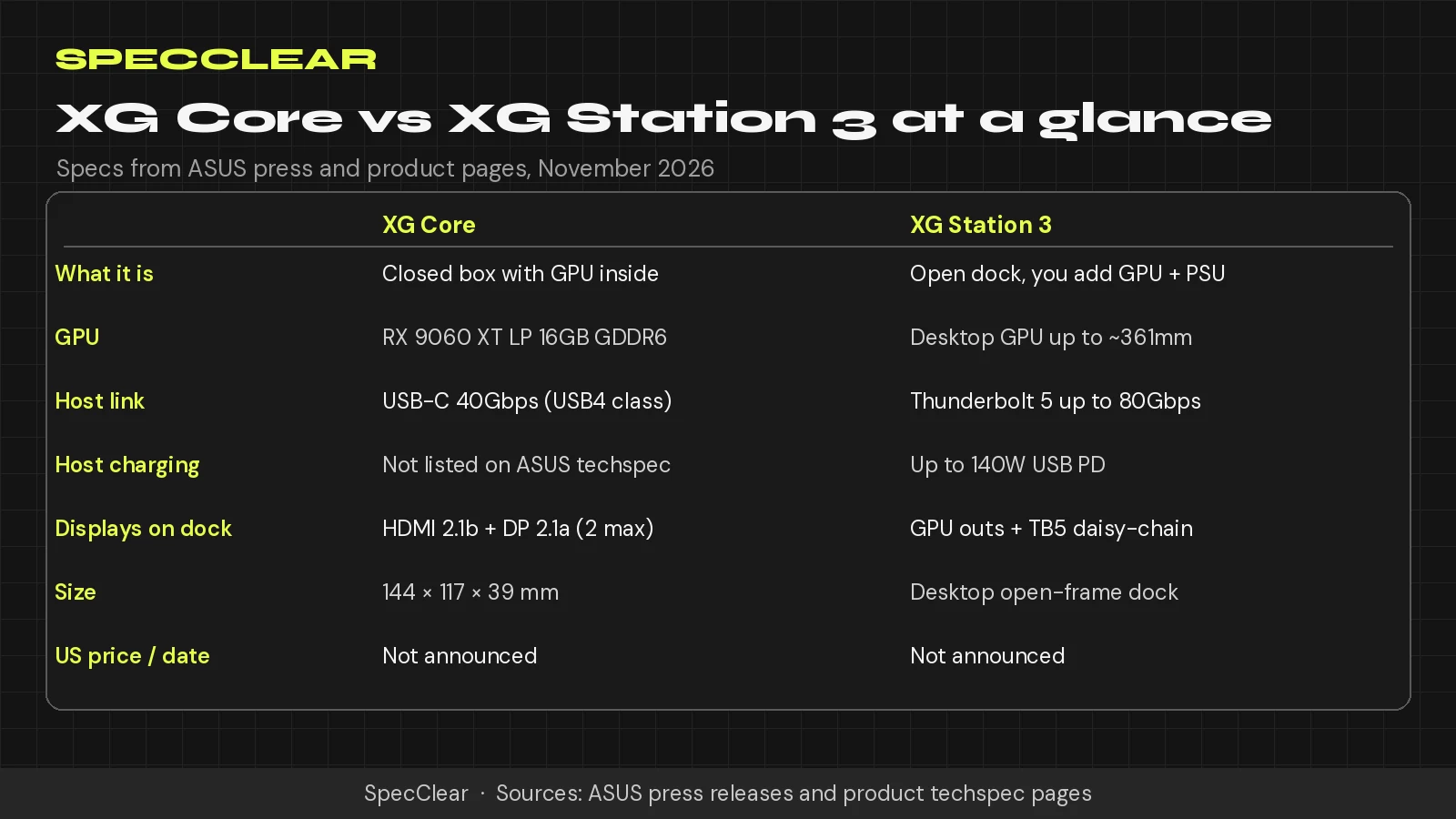
The XG Core is a closed external graphics module. Model name on ASUS’s site is XG-CORE-RX9060XT-LP-16G. Inside is an AMD Radeon RX 9060 XT LP with 16GB of GDDR6 on a 128-bit bus at 20Gbps, 2,048 stream processors, and RDNA 4. ASUS lists a default boost clock up to 1,600MHz (game clock up to 1,010MHz) and an OC mode in GPU Tweak III up to 1,620MHz boost / 1,030MHz game clock. That is a lot lower than a desktop RX 9060 XT, which is the whole point of the “LP” label.
The box measures 144 x 117 x 39mm. Host link is USB4 up to 40Gbps over one USB Type-C port. A second USB-C port is for power, and ASUS includes a USB-C cable, USB-C adaptor, USB-C DC cable, and power cord. Display outs are one HDMI 2.1b and one DisplayPort 2.1a, with a max of two displays and a digital max resolution of 3840 x 2160. ASUS’s press materials also say it supports compatible Thunderbolt 3 hosts. The press release names the ROG Ally X and ROG Xbox Ally X as handheld examples; ASUS still tells you to check host compatibility before you buy.
ASUS does not list a TGP or host Power Delivery figure on the XG Core techspec page. Some outlets report about 75W total power citing ASUS; until ASUS prints a wattage on the product page, treat that as reported, not confirmed. Plan on keeping your laptop or handheld on its own charger.
XG Station 3: the desk dock
The ROG XG Station 3 is an open-frame Thunderbolt 5 eGPU dock. You supply the graphics card and an SFX or SFX-L power supply. ASUS says it supports NVIDIA GeForce RTX 50 Series, RTX PRO 6000 Series, AMD Radeon RX 9000 Series, and Intel Arc Series cards. Max GPU size on the FAQ is 361 x 139.3 x 93.9mm (L x W x H).
The headline link is Thunderbolt 5 at up to 80Gbps bidirectional, or up to 120Gbps one-way with Thunderbolt 5 Bandwidth Boost for video-heavy traffic. The upstream Thunderbolt 5 port also offers up to 140W of USB Power Delivery, so many laptops can charge over the same cable. A downstream Thunderbolt 5 port supports daisy-chaining up to three 4K displays and up to 36W PD for peripherals. Two front USB 10Gbps Type-C ports handle storage and gear. Aura Sync is supported.
The open frame is deliberate: the card stays visible and gets unrestricted airflow. A GC-HPWR slot lets you fit ASUS BTF 2.5 cards (ASUS names examples like the TUF Gaming GeForce RTX 5080 BTF OC Edition and ROG Astral GeForce RTX 5090 BTF Edition) so the PCIe power cable disappears. Standard cards still work; you just see the cable.
ASUS lists Thunderbolt 5 and Thunderbolt 4 support, and its compatible-device list also includes selected USB4 hosts such as the ROG Ally X and ROG Xbox Ally X. Check the listed BIOS requirements and confirm eGPU support with your PC manufacturer. Peak bandwidth requires Thunderbolt 5. US price and retail date are still not announced. A Malaysia launch report listed RM1,539 for early December 2026 there; that is a regional figure, not a US MSRP, and it still excludes the GPU and PSU.
Thunderbolt 5 vs USB4, in plain English
Think of the cable as a pipe between the laptop and the GPU. A normal desktop GPU sits in a PCIe x16 slot with far more pipe than any USB-C eGPU link. Thunderbolt 4 and the 40Gbps USB4 connection used by XG Core have the same headline link rate. Newer USB4 implementations can be faster, but that does not raise the XG Core link beyond 40Gbps. Thunderbolt 5 doubles the bidirectional rating to 80Gbps, with a one-way boost mode up to 120Gbps for display-heavy traffic.
That sounds like the XG Station 3 should crush the XG Core. Bandwidth is only half the story. Most game work happens inside the GPU’s own VRAM after textures load, so a 40Gbps link is often good enough rather than a disaster. Recent eGPU testing usually shows roughly 10 to 20 percent loss versus the same card in a desktop for many GPU-bound titles, with bigger hits when you render back to the laptop screen or put a flagship card behind a narrow pipe. Thunderbolt 5 should help more with high-end cards. Independent benches for these two docks are not out yet, so do not treat any percentage as a promise.
Also remember the XG Core’s GPU is already an LP part. Even if the cable were perfect, a 1.6GHz-class RX 9060 XT LP is not a desktop RX 9060 XT.
Who the XG Core suits
Handheld owners are the clearest audience. If you already bought into the ROG Ally X or you are watching the ROG Xbox Ally X20, an external RDNA 4 box with 16GB of memory is the kind of desk dock that turns “playable on the sofa” into “1080p or 1440p on a monitor” without building a second PC. The same pitch applies to thin laptops and mini PCs that only have integrated graphics, provided the host supports external GPUs over 40Gbps USB4 or compatible Thunderbolt 3.
If you are still deciding whether a handheld makes sense next to a desktop at all, start with our handheld gaming PC 2026 guide and the MSI Claw 8 EX AI+ review. An eGPU does not fix a bad handheld purchase. It multiplies a good one when you sit down.
Creators who want local AI image tools or small language models on the go get a second angle: ASUS explicitly calls out ComfyUI, LM Studio, and Ollama, and 16GB of GDDR6 matters more for that than raw gaming clocks. Performance still depends on the model and the host.
Who the XG Station 3 suits
This one is for people who already think like desktop builders. You want to keep a thin Thunderbolt laptop for travel, then dock into a serious GPU at home. You are fine buying a separate SFX or SFX-L PSU and a desktop card. You care about single-cable charging up to 140W. You might even want the BTF look.
It is a poor fit if your laptop only has plain USB-C without Thunderbolt or USB4 eGPU support, if you hate buying three products to finish one setup (dock + GPU + PSU), or if you expected a closed box with a card included. That last job is the XG Core’s.
When a desktop or a better laptop is the smarter buy
External GPUs solve a real problem: “I like this portable, and I want more graphics at a desk.” They are a bad answer to “I need the cheapest path to high frame rates.”
A mid-range desktop with a normal case, a mid-tier CPU, and a desktop RX 9060 XT or RTX 5060-class card will usually beat an eGPU setup on cost once you add the dock tax. A thicker gaming laptop with a proper mobile GPU avoids the cable tax entirely if you never leave the house without it. The XG Station 3 only makes financial sense when you already own (or will keep) a Thunderbolt laptop you like and you refuse to own a second full tower. The XG Core only makes sense when portability of the GPU itself matters, or when the host cannot take a desktop card dock.
If you are shopping parts for a real build this month, our Black Friday 2026 PC parts guide is the better starting point than waiting on unpriced eGPU docks.
What we still do not know
- US price for either product
- US ship date or retailer list
- Independent game benchmarks for both docks
- An official TGP figure for the XG Core on ASUS’s techspec page
- Whether the XG Core returns any Power Delivery to the host
- A comprehensive XG Core host compatibility list beyond the handhelds ASUS named
European placeholder listings for the XG Core have appeared at some retailers with no stock. Ignore pre-launch prices until ASUS or a major US store publishes a real offer.
Where to buy
There is no verified US Amazon or Newegg listing for the XG Core or the XG Station 3 as of 9 November 2026, so we are not attaching buy buttons for the docks themselves. Watch ASUS’s product pages and the usual stores. If you are buying a handheld or laptop that these docks target, shop that device on its own merits first.
Verdict
XG Core is the interesting one for Ally-class handhelds and thin machines that need a packable RDNA 4 bump with 16GB of memory. XG Station 3 is the interesting one for Thunderbolt 5 laptop owners who want a desk GPU they can upgrade like a desktop. Neither is a substitute for a proper PC if raw value is the goal, and neither is buyable in the US with a confirmed price yet. Wait for street pricing and third-party benches before you rearrange a build around either dock.
Sources
- ASUS ROG XG Station 3 press release
- ASUS XG Core press release
- ASUS XG Core techspec
- ROG XG Station 3 product page
- PCTestBench XG Core spec rundown
- Pokde.net Malaysia XG Station 3 pricing note
- ASUS XG Station 3 compatible-device list and BIOS requirements
- Ars Technica on the original XG Station at CES 2007
- The Verge on Alienware Graphics Amplifier history
- Razer Core Thunderbolt 3 announcement, March 2016
- PC Gamer external GPU performance testing