
As an Amazon Associate I earn from qualifying purchases.
HAVN launched the HS 360 globally on 29 October 2026, a few months after showing it at Computex in June, and it comes in two versions that look almost the same in photos but are built for different builds, so the real question is not whether the HS 360 is good but whether you need the VGPU kit that adds $80 to the launch MSRP. The standard HS 360 launched at $199.99 and the HS 360 VGPU at $279.99, both are sold on Amazon US and neither is listed on Newegg US at the time of writing.
To be clear, both versions of this case are good, and the difference is mainly aesthetics. GPU cooling does improve with the VGPU version, but that doesn’t mean the standard version will somehow make your GPU run hotter. These are well ventilated cases, and how you set up the airflow through your system will give different results depending on what you do.
We have not tested either case ourselves, so everything below comes from HAVN’s own spec pages and from the published reviews at GamersNexus, TweakTown, Club386, OC3D and PC Guide, and we credit each one where we use its numbers.
The short answer
Buy the standard HS 360 if you want your graphics card mounted the normal way, want the most radiator choice and the most GPU clearance, or simply want the cheaper of the two, and buy the HS 360 VGPU if the whole point of the build is a vertical card behind the glass and you want it to run close to horizontal temperatures without buying and fitting your own riser and bracket. Both share the same shell, the same front I/O and the same fan layout, so this is really a decision about the GPU mount and what comes with it.
What both versions share
The two cases use the same mid-tower body at 490.9 x 242.1 x 520.9mm, which HAVN says is 19.4% smaller and 29.5% lighter than the HS 420, and both take ATX, Micro-ATX, Mini-ITX and back-connect BTF ATX boards, though there is no E-ATX support, so check your motherboard before anything else. Each has room for up to 11 120mm fans (three on top, three on the right side, three on the bottom and two at the rear), an 8-port PWM fan repeater on the cable tray, ATX, SFX and SFX-L power supplies up to 230mm long, and a front panel with one 10Gbps USB-C port and two USB-A ports.
Tower cooler clearance is where the sources disagree a little, since HAVN’s product pages now say up to 175mm while the spec tables published by GamersNexus and PC Guide list 170mm, and HAVN recommends liquid cooling on both, so treat anything over 170mm as a risk. If you are still choosing between this layout and a more conventional airflow case, our PC case design guide explains how dual chamber and panoramic cases trade airflow for looks.
HS 360 standard: the flexible one
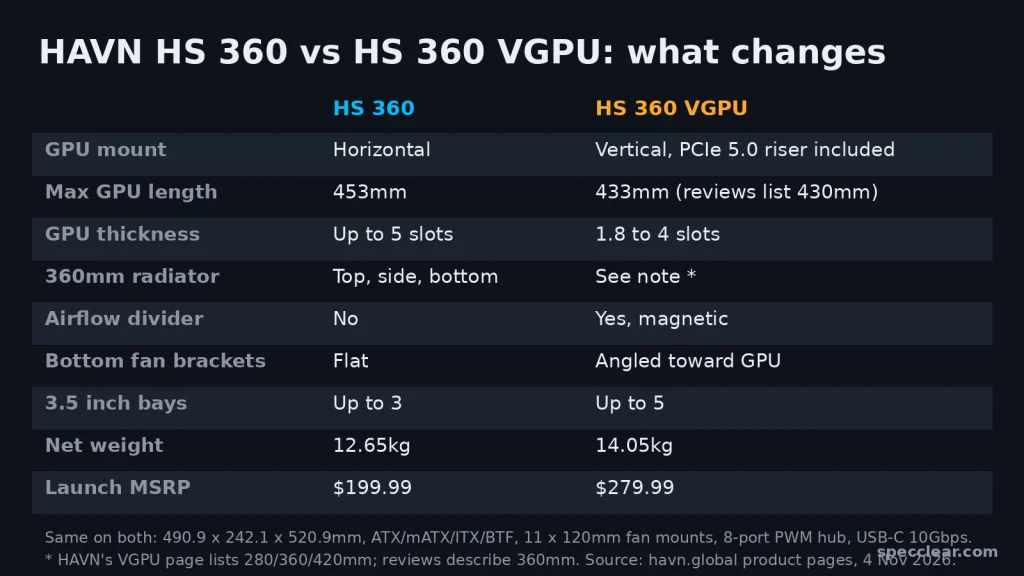
The standard HS 360 mounts the graphics card horizontally and gives it a lot of room, with HAVN listing up to 453mm of GPU length and support for cards up to five slots thick from the second slot position (four from the third). You also get the most cooling choice, since HAVN rates the top, side and bottom mounts for 120, 240 or 360mm radiators, and the case weighs 12.65kg, the lighter of the two.
The 3-way adjustable GPU support bracket is a nice touch for heavy cards and also handles single-slot GPUs, and if you want to understand where intake and exhaust should go in a glass-fronted case like this one, our fish tank case fan setup guide walks through it, because the fan layout matters more here than in a mesh-front box.
HS 360 VGPU: the showcase one
The VGPU version ships with a vertical bracket that takes cards from 1.8 to 4 slots thick, a PCIe 5.0 x16 riser cable, a magnetic airflow divider that sits above the card, and angled bottom fan brackets that push intake air at the GPU, and OC3D lists all four of those add-ons as what justifies the higher price. The bracket also slides horizontally so you can set the gap between the card and the glass air guide, which is the detail that usually decides whether a vertical card runs hot, as we explain in our article on whether a vertical GPU mount hurts temps.
GPU length drops to roughly 430 to 433mm depending on the source (HAVN’s page says 433mm, the GamersNexus and PC Guide tables say 430mm), it weighs 14.05kg, and storage goes up, with HAVN listing four 3.5 inch bays on the right fan mount plus one on the cable tray, which PC Guide’s launch report rounds up as 5 x 3.5 inch drives. One thing we could not pin down is radiator support: HAVN’s VGPU page lists 280, 360 and 420mm mounts while the case only takes 120mm fans and every review we read describes 360mm support, so plan around a 360mm radiator and check the listing if you need more.
The included riser matters more than it sounds, because a PCIe 5.0 riser bought separately is not cheap and Club386 points out that a large chunk of the VGPU’s price comes from it, so if you would otherwise buy your own riser and bracket the price gap shrinks a lot. Our PCIe 5.0 vs PCIe 4.0 gaming breakdown explains whether Gen 5 even matters for your card.
Does the airflow divider actually work?
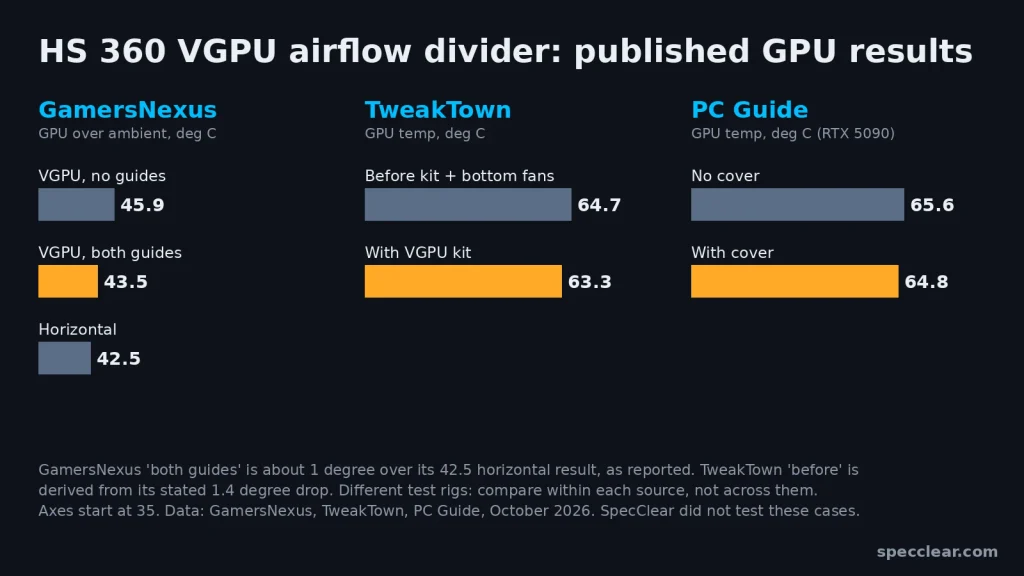
This is the claim that sells the VGPU, and the published data mostly backs it up, although the size of the gain depends on who tested it and how. GamersNexus found the VGPU layout with both glass guides fitted ran only about one degree warmer over ambient than the same build with the card horizontal (42.5 degrees over ambient), and that removing the guides pushed it to 45.9 degrees, concluding that the guides “are absolutely working this time” after the HS 420’s version did little in its testing.
TweakTown measured a 1.4 degree drop on the GPU and a 3.6 degree drop on the CPU after adding three bottom fans and the VGPU kit, which moved the case into its top five for GPU temperatures, and Club386 says the dividers “can demonstrably improve the thermals and noise levels” on a vertical card. PC Guide is the cautious voice, measuring 64.8 degrees with the cover against 65.6 degrees without it on an RTX 5090, less than a degree, so the fair reading is that the divider closes most of the usual vertical-mount penalty rather than making the card cooler than a horizontal one.
What the reviews say overall
TweakTown scored the HS 360 VGPU 93% and called it “a great case”, with thermal performance, build quality and BTF compatibility as its pros and no ARGB as its main con, while Club386 praised material quality it calls “among the best I’ve ever seen from a PC case” but flagged fiddly installation and the lack of an ARGB hub. OC3D reported strong cooling results, and PC Guide gave the VGPU 5 out of 5 for its design and easy building, although its review lists $149 and $219 prices that no longer match the $199.99 and $279.99 launch MSRPs HAVN now shows, so ignore those figures.
The common complaint is cost, and it is tied to fans. HAVN’s product pages do not say whether any fans are included, and TweakTown, Club386 and PC Guide all describe their review units as shipping with no fans, so budget for a full set of 120mm fans on top of the case and check the listing before you order. If fans are part of your budget anyway, our Phanteks EX5, EX6 and XT M5 review is worth reading as a comparison.
Where to buy
Both versions are on Amazon US through a third-party seller rather than Amazon itself, so check the seller name, stock and return terms on the listing before you buy.
- HAVN HS 360 standard on Amazon: check current price (launch MSRP $199.99)
- HAVN HS 360 VGPU on Amazon: check current price (launch MSRP $279.99)
Verdict: which one should you buy?
Buy the HS 360 standard if you plan to mount your graphics card horizontally, you own or want one of the longest cards on the market and need the extra 20mm or so of clearance, you want 360mm radiator options on the top, side and bottom, or you would rather put the $80 difference toward fans, which you will almost certainly need to buy anyway.
Buy the HS 360 VGPU if a vertical card is the reason you want this case, you want a PCIe 5.0 riser and bracket that are designed for the chassis instead of a third-party kit, you value the airflow divider and angled bottom fans that the published tests show bring vertical temps close to horizontal, or you need more 3.5 inch drive bays.
Skip both if your build needs an E-ATX board, a tower cooler taller than 170mm, or a case that ships with fans in the box, because neither version covers those without compromise. For most people building a horizontal GPU system the standard HS 360 is the better value, but if you were already going to buy a riser and dream of a vertical card behind the glass, the VGPU is the one that does it properly.