
SpecClear earns a commission if you buy through Newegg links on this page, at no extra cost to you.
Buying one stick of RAM used to be a rookie mistake. In 2026 it’s a budget tactic, and the lab data shows that single stick RAM DDR5 setups give up far less performance than the old DDR4 rule of thumb suggests. Desktop DDR5 averaged $17.08 per GB in September, up 12% on August, according to RamRadar’s price index, so it’s worth knowing exactly what one stick costs you before you pay for two.
Last checked: 4 October 2026. Newegg prices and stock below were read from the product pages that day. They move daily, so treat them as a snapshot.
The short answer
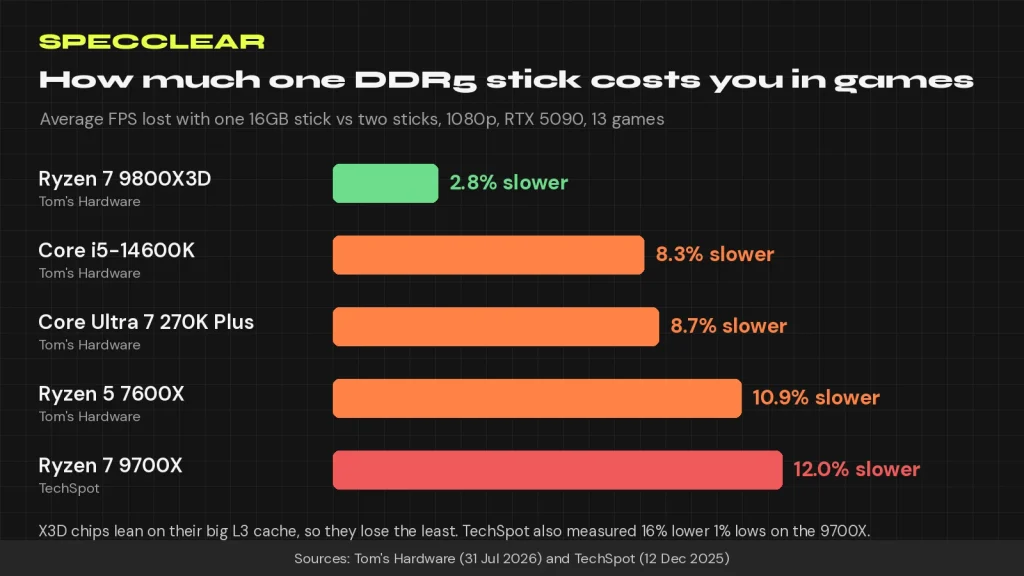
In lab tests, one DDR5 stick costs you roughly 3 to 12% of your average frame rate, and your CPU decides most of that. Tom’s Hardware measured a 2.8% drop on a Ryzen 7 9800X3D and drops of 8.3 to 10.9% on regular Ryzen and Intel chips across 13 games, while TechSpot found a 12% average drop and 16% lower 1% lows on a Ryzen 7 9700X at 1080p. Both outlets tested with an RTX 5090 at 1080p to make memory the bottleneck, so with a mid-range card, or at 1440p and 4K, the gap usually shrinks.
That makes one stick a reasonable stopgap if you plan to add a matching second stick later. It’s a poor choice if you game on integrated graphics or chase every last frame in competitive shooters.
Why one DDR5 stick isn’t the DDR4 disaster you remember
With DDR4, one stick meant one 64-bit channel and half the bandwidth, full stop. DDR5 changed the layout. Tom’s Hardware explains that each DDR5 module carries two independent 32-bit subchannels, each with its own command and address interface, so a single stick can run two memory operations at once. You still get half the total bandwidth of a two-stick setup, but one module behaves a little like dual-channel memory.
That’s why Tom’s found that one fast DDR5 stick beat dual-channel DDR4 on the same Core i5-14600K, by 6.8% in 007 First Light and 6.9% in Starfield. Two sticks are still better, because they give the CPU four subchannels instead of two. The difference is that for many games the penalty is now a single-digit percentage rather than the cliff people remember.
How much FPS you lose, by CPU type
Ryzen X3D chips lose the least
The 9800X3D’s large L3 cache hides most of the lost bandwidth. Tom’s measured a 2.8% average drop, identical results in several games, just 1.6% in Starfield and 4.2% in Doom: The Dark Ages. If you already own an X3D chip (our comparison of the 7700X3D, 7800X3D and 9800X3D covers the lineup), one stick is the least painful way to wait out high RAM prices.
Regular Ryzen and Intel chips lose 8 to 12%
Tom’s recorded drops of 10.9% on the Ryzen 5 7600X, 8.7% on the Core Ultra 7 270K Plus and 8.3% on the Core i5-14600K. TechSpot’s 9700X results line up with that: 12% slower on average and 16% worse 1% lows at 1080p, narrowing to 9% and 13% at 4K. The 1% lows matter most here, because they’re the stutters you actually feel rather than a smaller number on a counter.
Games that hurt most, and games that barely notice
The averages hide big swings. On the 7600X, Doom: The Dark Ages lost 17.3% with one stick, and the 270K Plus lost 14%. TechSpot saw Marvel Rivals fall from 195 to 129 fps at 1080p on the medium preset, ARC Raiders lose 27% of its 1% lows at 1080p, and Spider-Man 2 drop 15% on average with nearly 20% lower 1% lows.
Other games hardly care. TechSpot measured about a 5% drop in Counter-Strike 2 and almost no change in Cyberpunk 2077, and Tom’s saw only minor losses in GPU-heavy titles such as The Last of Us Part One. If the games you play are limited by your graphics card at your resolution, you may not notice one stick at all.
The important thing to take away here is that doing the research and comparing that with the games you play and the resolution you play them at will give you the knowledge to work out if you can make it work with one stick or not. There is no blanket solution that will let you play with one stick of RAM across everything.
1x16GB vs 2x8GB vs 2x16GB at today’s Newegg prices
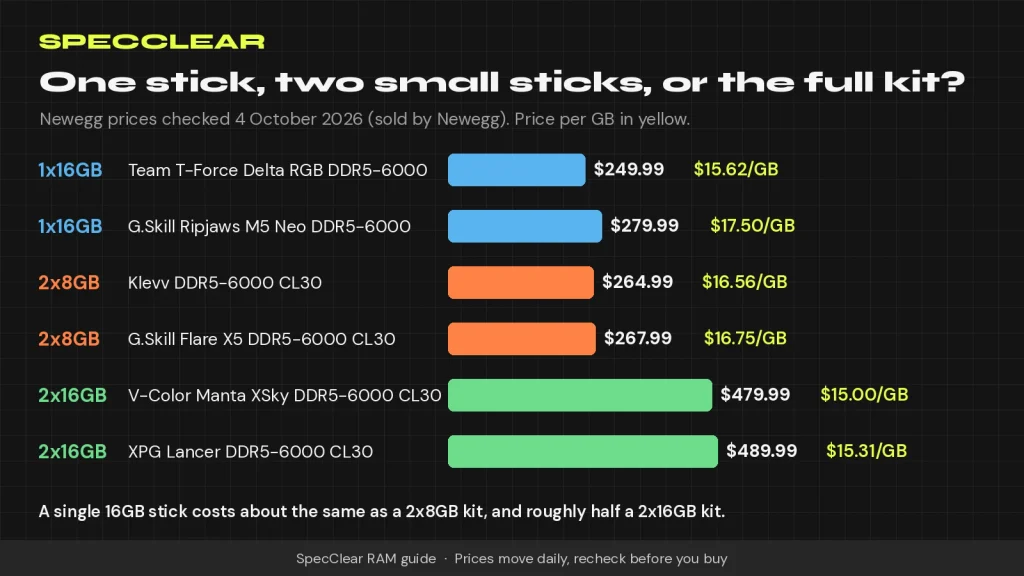
This is the choice most buyers actually face. Every product below was sold by Newegg and in stock when we checked the product pages on 4 October 2026.
| Setup | Product | Price on 4 Oct | Per GB |
|---|---|---|---|
| 1x16GB | Team T-Force Delta RGB 16GB DDR5-6000 | $249.99 | $15.62 |
| 1x16GB | G.Skill Ripjaws M5 Neo RGB 16GB DDR5-6000 | $279.99 | $17.50 |
| 2x8GB | Klevv 16GB (2x8GB) DDR5-6000 CL30 | $264.99 | $16.56 |
| 2x8GB | G.Skill Flare X5 16GB (2x8GB) DDR5-6000 CL30 | $267.99 | $16.75 |
| 2x16GB | G.Skill Flare X5 32GB (2x16GB) DDR5-6000 CL30 (AMD EXPO, not for Intel Core Ultra) | $479.99 | $15.00 |
| 2x16GB | XPG Lancer 32GB (2x16GB) DDR5-6000 CL30 | $489.99 | $15.31 |
A single 16GB stick costs about what a 2x8GB kit costs, and roughly half a 2x16GB kit. Per gigabyte, the 32GB kits are the cheapest of the lot at $15.00 to $15.31, close to RamRadar’s 4 October desktop DDR5 median of $15.59 per GB. Be careful with marketplace listings, though. On the same day we found single 16GB Kingston Fury Beast sticks from third-party sellers at $362 to $516, which is more than a whole 2x8GB kit sold by Newegg.
Which one should you buy?
- Buy the 2x16GB kit if you can stretch to it. It’s the cheapest memory per gigabyte here, it runs in dual channel from day one, and a kit is sold as a matched pair. The G.Skill Flare X5 DDR5-6000 CL30 (AMD EXPO) ($479.99) and XPG Lancer DDR5-6000 CL30 ($489.99) both run at 6,000 MT/s, which Tom’s calls AMD’s sweet spot.
- Buy one 16GB stick if you’ll go to 32GB later. The Team T-Force Delta RGB 16GB DDR5-6000 ($249.99) is sold as a single module, so you can buy the identical part again when prices calm down. The G.Skill Ripjaws M5 Neo RGB 16GB DDR5-6000 ($279.99) is another single-module option. PCWorld makes the case for capacity too, recommending 32GB of DDR5-5600 over 16GB of DDR5-7200.
- Buy 2x8GB only if 16GB is your ceiling. The G.Skill Flare X5 2x8GB DDR5-6000 CL30 ($267.99) or Klevv 2x8GB DDR5-6000 CL30 ($264.99) give you full dual-channel speed now, but reaching 32GB later means replacing both sticks or filling all four slots. Our guide to how much RAM you need for gaming covers when 16GB stops being enough.
Who shouldn’t run one stick
- Anyone gaming on integrated graphics. An APU or iGPU uses system memory as video memory, and Tom’s Hardware says plainly that dual-channel memory is vital if you’re using an iGPU.
- High-refresh competitive players on non-X3D CPUs. If you’re already CPU-limited at 1080p, the 8 to 12% hit measured by Tom’s and TechSpot lands exactly where you’ll feel it.
- Heavy multitaskers and streamers. Tom’s notes that 16GB on one stick will cause performance problems if you run several applications alongside your game. That’s a capacity limit rather than a channel one, but single-stick builds hit it first.
- Prebuilt buyers who didn’t choose it. Tom’s says single-DIMM DDR5 has shown up in dozens of prebuilts. Check the Memory page in Task Manager’s Performance tab for how many slots are used, and see our prebuilt vs custom build breakdown before you buy.
How to add a second stick later without instability
Adding a stick that wasn’t sold as part of a kit usually works, but nobody can promise it will. Tom’s warns that two separately bought modules, even of the same model, can use memory chips from different sources, and TechSpot cautions that the exact module you buy today may not be on shelves later. This is the safest way to go about it.
Match the model, speed, timings and capacity
Buy the same brand and model number at the same speed, timings and 16GB capacity. ASUS goes a step further in its motherboard manuals and recommends modules of the same version or date code from the same vendor. Mismatched capacities can still work, but the same manual explains that only the matching portion runs in dual channel while the excess runs in single channel. Keep your receipt in case the pair won’t cooperate.
Use the right slots
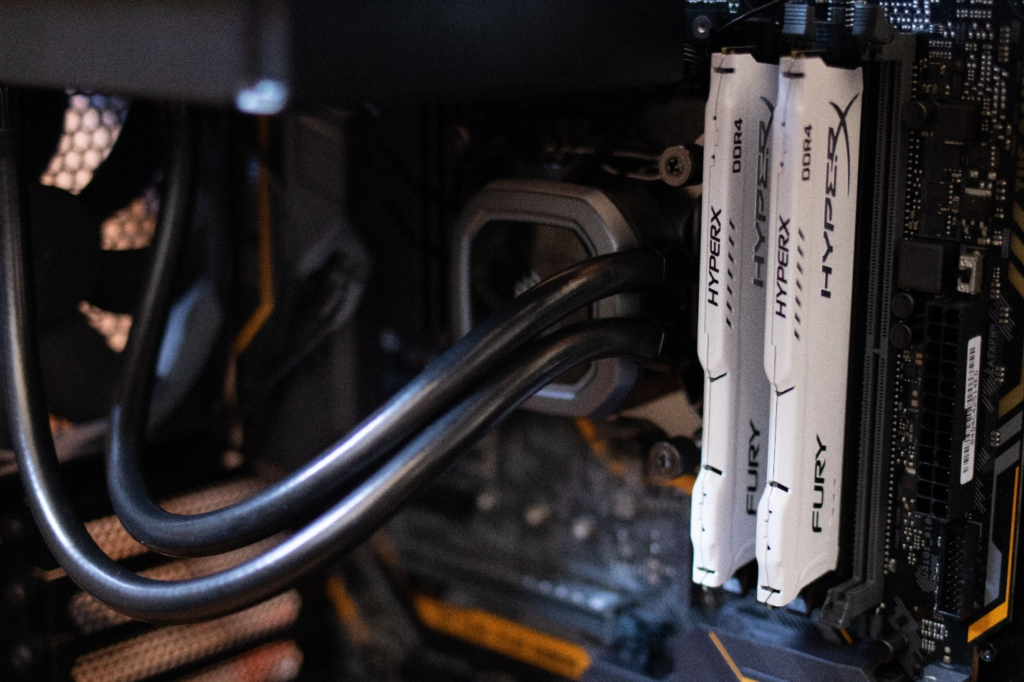
On a four-slot board, ASUS’s support guidance is to put a single module in DIMM_A2 and a pair in A2 and B2. Other brands use similar labels, so check the memory configuration table in your motherboard manual. Our RAM installation guide shows how to find the right slots on your board.
Test at stock speed first, then turn EXPO or XMP back on
- Install the second stick and boot with EXPO or XMP switched off, so both sticks run at their default JEDEC speed. Our BIOS settings guide shows where the toggle lives.
- Play the games you normally play, then run a memory test. Tom’s suggests MemTest64, and our RAM stress test guide covers that and the alternatives.
- Leave the PC in that state for a few days and watch for blue screens, application crashes or odd slowdowns, as Tom’s recommends.
- Turn EXPO or XMP back on and repeat the testing. If it won’t stay stable, the honest fix is to sell both sticks and buy a matched kit, which Tom’s also suggests.
One more trap to avoid: if a cheap listing tempts you, spend five minutes with our guide to spotting counterfeit DDR5 first.
The verdict
One DDR5 stick is a legitimate way to finish a build in a year when TrendForce still projects conventional DRAM contract prices to rise 10 to 15% quarter on quarter in the final quarter of 2026. It isn’t free, and it’s the wrong call for an iGPU system, but on an X3D chip you’ll barely notice it, and on most other CPUs you’re looking at single digits to low teens in the majority of games. If you want a simple rule, use this one:
- If you can afford 32GB now, buy a 2x16GB kit, because it’s the best value per gigabyte.
- If you need to save money and want 32GB later, buy one 16GB stick that’s sold on its own, then add the identical stick.
- If you use integrated graphics, always run two sticks.
For the bigger picture on prices, read why RAM is so expensive right now. If you’re deciding between AM4 and AM5 because of the memory bill, our Ryzen 5 5500F vs 5600 vs 7500 comparison runs the numbers, and our best RAM for gaming guide covers speeds and timings in more depth.