
SpecClear earns a commission if you buy through Newegg links on this page, at no extra cost to you.
When your PC shuts down when gaming with no blue screen, the screen goes black, the fans stop and Windows has nothing to say about it. That silence is a clue in itself. A crash that Windows can catch usually leaves a stop code or an error message behind, while an instant power-off points toward power delivery or heat, and that’s where this guide spends most of its time.
Last checked: 4 October 2026. Sources and Newegg prices below were checked that day.
Which kind of shutdown is it?
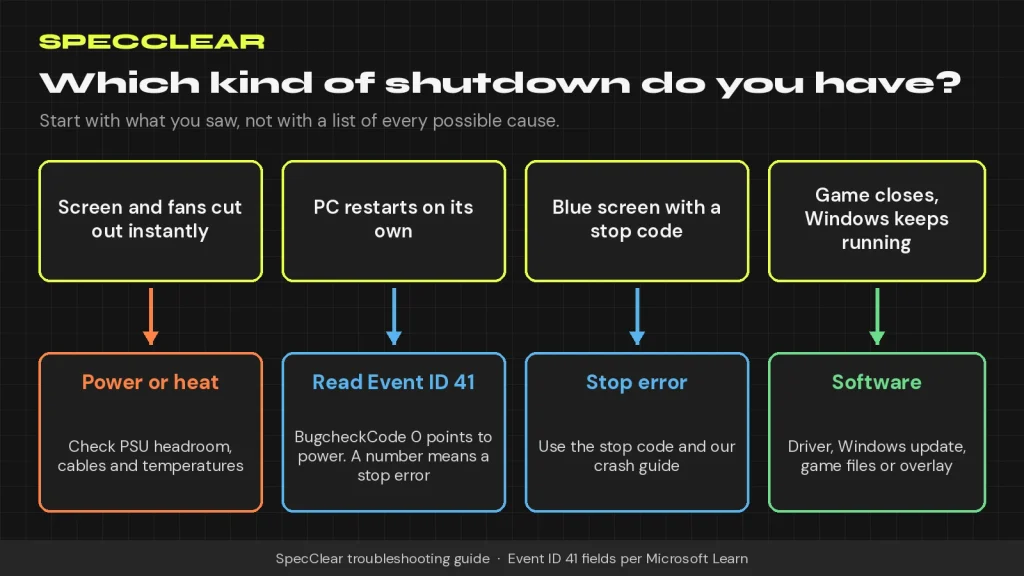
Before you change anything, pin down what you actually saw, because each pattern points somewhere different.
| What you see | What it usually points to | Where to start |
|---|---|---|
| Screen and fans cut out instantly, and the PC may stay off | Power delivery, or a thermal cutoff | Event ID 41, temperatures, then the PSU |
| The PC restarts on its own | A stop error with automatic restart on, or power | The BugcheckCode in Event ID 41 |
| A blue screen with a stop code | A driver, memory or hardware fault that Windows caught | Our PC crash diagnosis guide |
| The game closes to the desktop | The game, a driver or a Windows update | Updates, drivers and game files |
If you’re seeing blue screens or freezes, our guide to diagnosing PC crashes covers stop codes, memory dumps and WinDbg in detail. This page is about the first two rows, where the power simply goes.
Read Event ID 41 the right way
After any unexpected shutdown, Windows logs a Kernel-Power Event ID 41 when it next starts. Open Event Viewer, go to Windows Logs and then System, and filter the log for Event ID 41. Event 6008, which records an unexpected shutdown, is worth noting too because it marks the time. Then open the Details tab of the Event 41 entry, where Microsoft’s documentation explains what each field means.
If BugcheckCode is a number
A non-zero BugcheckCode means Windows hit a stop error and restarted. Microsoft notes that the code is stored in decimal, so 159 becomes 0x9F once you convert it in Calculator’s Programmer mode. Treat this as a crash rather than a power problem and follow the stop code. If you never see the blue screen itself, Microsoft suggests clearing the Automatically restart box under Startup and Recovery so the error stays on screen next time.
If PowerButtonTimestamp is a number
That means the power button was held down, usually because the PC had frozen. The question then becomes why it hung, not why it lost power, and the crash guide is the better place to start.
If everything is zero, or there’s no Event 41 at all
This is the pattern behind a true power-off. Microsoft says a zero bug check code, or no Event 41 at all, might indicate a power supply problem, because the PC shut down too quickly to write anything, and it lists an underpowered or faulty power supply among the likely causes. When every value is zero, also look for Event ID 46 from volmgr, which means Windows couldn’t set up a crash dump, so a stop error may still be hiding behind the zeros.
For this scenario Microsoft’s isolation steps are to disable overclocking, check the memory, check the power supply’s wattage and check for overheating. The rest of this guide follows that order.
Rule out software and tuning first
Software problems usually crash the game rather than switch off the whole PC, but September 2026 gave plenty of people reason to wonder. Windows Latest reports that Microsoft has confirmed the KB5124010 update, released on 22 September, can make some apps and games that use Windows’ built-in AC-3 audio decoding fail to launch or close without warning. That’s a crash to the desktop, not a power cut, and our guide to Windows updates breaking games explains how to roll an update back.
Tuning is the bigger suspect. Put the CPU, GPU and memory back to stock by turning off EXPO or XMP, removing any GPU overclock or aggressive undervolt, and disabling CPU boost overrides in the BIOS. An undervolt that passes a benchmark can still fail in one particular game. If the shutdowns stop at stock settings, add your tweaks back one at a time, and use our GPU undervolting guide to dial one in more gently.
Check heat in the exact game that trips it
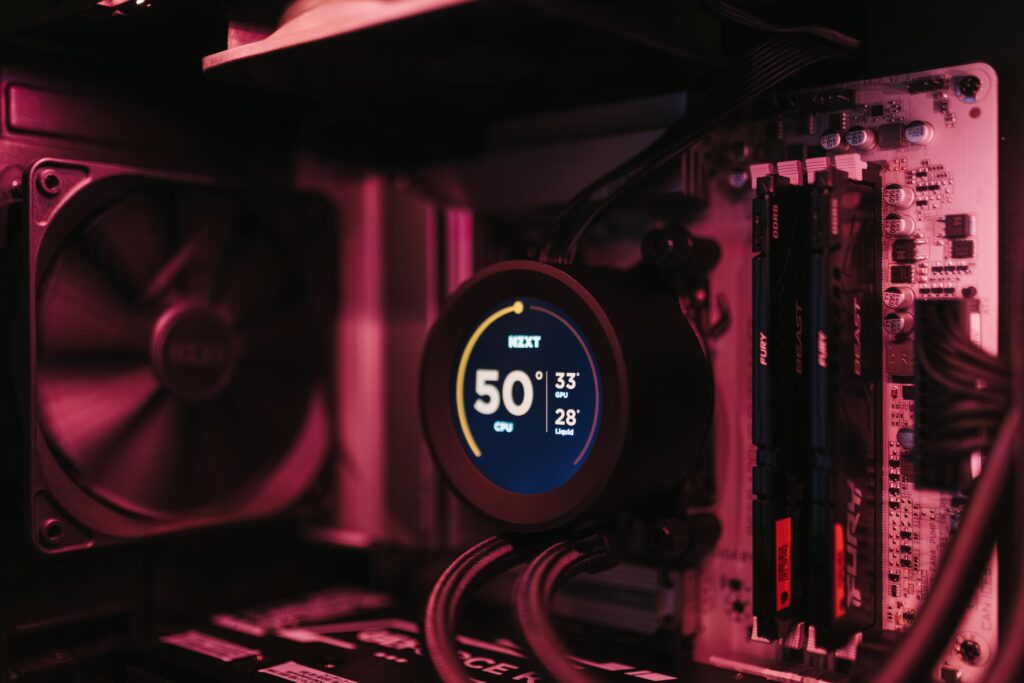
Thermal shutdowns are rarer than most people think, because CPUs and GPUs throttle long before they cut power, but a failed pump, a stopped fan or a cooler that has lost contact can still get there. Log temperatures with HWiNFO while you play the game that causes the shutdown, then read the log after the next power-off. Our guide to safe CPU and GPU temperatures gives you the numbers to compare against, and our thermal throttling guide covers the fixes.
If the CPU temperature climbs sharply right before each shutdown, check the cooler’s mounting pressure and fan header first. If the cooler is simply too small for the chip, a dual-tower air cooler such as the Thermalright Peerless Assassin 120 SE ($47.90 from Thermalright’s own Newegg store on 4 October) is an inexpensive upgrade.
Check power, the most common cause of instant power-offs
Transient spikes trip PSU protection
Modern graphics cards don’t draw power smoothly. Seasonic explains that cards such as the RTX 50 series produce short transient spikes that can jump hundreds of watts above their normal draw in a split second, and an older or marginal power supply responds by tripping its over-current or over-power protection. One of the symptoms Seasonic lists is close to this one: sudden reboots with no errors or warnings, along with a black screen and a sudden reboot. It often appears right after a GPU upgrade on the old PSU, and only in demanding games.
Do the headroom math
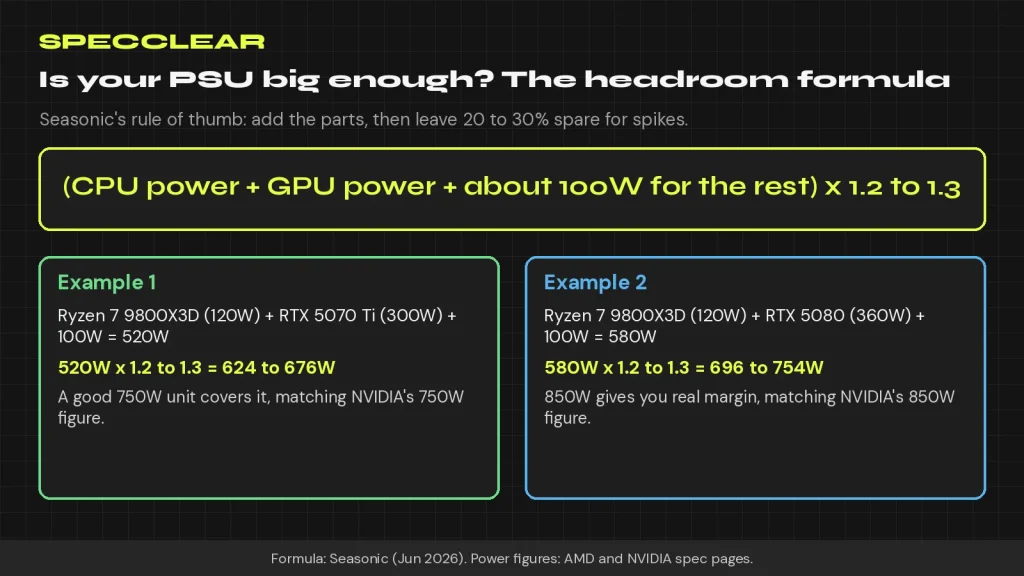
Seasonic’s rule of thumb is to add the CPU and GPU power, add about 100W for everything else, then multiply by 1.2 to 1.3. A Ryzen 7 9800X3D (120W TDP, per AMD) with an RTX 5070 Ti (300W, per NVIDIA) comes to 520W, or 624 to 676W after headroom, which fits NVIDIA’s 750W system power recommendation for that card. Swap in an RTX 5080 (360W) and you’re at 696 to 754W, where NVIDIA recommends 850W. Seasonic adds that a PSU running at 80 to 90% load after an upgrade is already in the danger zone. Our PSU buying guide and PSU wattage calculator walk through the full sizing.
Age, cables and the 12V-2×6 plug
Seasonic also cautions that a power supply’s stability can drop once it’s 5 to 7 or more years old, even when the wattage still looks fine on paper, and it lists overheating cables or a hot smell from a 12V-2×6 connector among the warning signs. Check the cabling while you’re at it. Where your PSU allows it, run a separate PCIe cable to each 8-pin socket on the card rather than one daisy-chained cable, and push a 12V-2×6 plug fully home without bending the cable sharply close to the connector. Our article on the RTX 5090 connector melting problem explains why seating matters so much.
The new GPU cables and adapters need to be treated with care, as the risk of fire and resulting hardware damage is very real when the basics are not respected right from the start.
Isolate the cause one change at a time
Change one thing, test in the same game for the same length of time, and only then move on. Changing three things at once tells you nothing.
- Load BIOS defaults and test the game that triggers the shutdown.
- Log CPU and GPU temperatures during that test.
- Reseat every power cable at both ends: the 24-pin, the CPU 8-pin and the GPU cables.
- Plug the PC straight into a different wall socket, without a power strip, to rule out the mains. Microsoft suggests a UPS if interruptions to the power itself turn out to be the cause.
- Stress the CPU and the GPU separately, then together, using our PC stress test guide. A shutdown that only happens in the combined test points strongly at the PSU.
- Test with a known-good power supply of adequate wattage, either borrowed or bought from a store with an easy return policy.
Two safety notes. Skip the paperclip test you’ll see in videos, because it only shows that a PSU switches on, not that it holds steady under a gaming load. And never open a power supply, since its capacitors can hold a dangerous charge even when it’s unplugged. If the PC won’t turn back on at all after a shutdown, our PC won’t turn on guide picks up from there.
If it’s the PSU: sensible replacements
If the swap test or the math points at your power supply, buy a quality ATX 3.1 unit with a native 12V-2×6 cable rather than simply the biggest number you can find. Our PSU tier list covers which brands to trust. These were in stock at Newegg, sold by Newegg, when we checked the product pages on 4 October 2026:
- Phanteks AMP GH 850W ($84.99): a fully modular ATX 3.1 unit with enough capacity for an RTX 5080 build by NVIDIA’s 850W figure.
- Montech Century II 850W ($89.90): listed as 80 Plus Gold and Cybenetics Platinum, a sensible 850W alternative.
- Thermaltake Toughpower GT 850W ($109.99): ATX 3.1, but its native PCIe 5.1 connector is rated at 450W, so it suits cards up to the RTX 5080 class rather than an RTX 5090.
- MSI MPG A1000GS PCIE5 II ($109.99): a 1,000W unit with dual 12V-2×6 cables, which meets NVIDIA’s 1,000W recommendation for the RTX 5090.
- CyberPower CP1500PFCLCD ($239.95): a 1,500VA sine wave UPS, worth it only if your shutdowns line up with flickering or unreliable mains power.
Prices move quickly in this category. Newegg listed the MSI MAG A850GL PCIE5 at $109.99 on 28 September and $123.99, out of stock, on 4 October, so recheck any price before you buy.
Most no-blue-screen shutdowns come down to power, heat or tuning, and you can usually prove which in an evening: read Event ID 41, go back to stock, log your temperatures and do the headroom math before you spend money. If the noise from your graphics card is bothering you too, our GPU coil whine guide uses the same GPU-or-PSU logic.