

White is now the second most popular PC colour after black. That’s not a trend anymore: it’s the default aesthetic choice for a significant portion of builders and it shows no sign of reversing. The component selection has caught up to the demand. You can build a genuinely clean all-white system in 2026 at almost every budget tier, from mid-range 1080p builds up to flagship 4K machines, without making any performance compromises at all.
What you can’t do is walk into a build without planning it. White components cost more than their black equivalents, have fewer SKUs at some price points, and certain components, PSUs, storage, simply don’t exist in white in any form worth buying. The rules for what to spend on and what to skip are not obvious if you haven’t built one before.
This guide tells you exactly what to buy white, what to buy black, where the genuine pitfalls are, and how to plan a white build that still looks correct six months after completion.
Why White Builds Are Harder Than They Look
The obvious challenge is colour matching. Manufacturers use different shades of white across their product lines. Asus’s white is slightly cooler and more grey-toned. MSI’s white runs warmer. Gigabyte’s ICE range hits a clean bright white that most other components struggle to match exactly. NZXT’s white is close to off-white. If you put an MSI white GPU next to an Asus white AIO inside a Gigabyte ICE case under direct light, the differences are visible.
This isn’t a reason to panic. Real-world builds photographed in the diffuse lighting of most rooms are significantly more forgiving than direct sunlight reveals. But it is a reason to choose your primary components from the same manufacturer’s white range where possible, and to test-fit and visually check before finalising a purchase if you’re mixing brands.Best PC Cases for Airflow 2026
The less obvious challenge is yellowing. White components, particularly white PETG tubing and white plastic fan frames, yellow over time when exposed to UV light. If your build is near a window that receives direct sunlight, white components will visibly discolour within a year. Keep white builds away from direct UV exposure. White acrylic case panels yellow faster than white ABS plastic. Mesh panels over white frames yellow less than pure white solid panels.
The third challenge is dust visibility. Black components hide dust. White components show it. A white interior that looks pristine after a build will show dust accumulation visibly within two months. Plan for quarterly cleaning, compressed air across the intake fans, wipe-down of visible surfaces, dust filter cleaning, and set a reminder. A neglected white build looks worse than a neglected black one.
The Rules: What to Buy White and What to Skip
Before the component list, the framework that determines where to spend the white premium and where to save it.
Buy white: case, GPU, CPU cooler (AIO pump head, radiator, and fans), RAM, case fans visible through mesh panels, cables.
Skip white: PSU, SSD, rear exhaust fans (usually hidden in shadow), bottom-mounted fans (invisible from normal viewing angles).
The logic is straightforward. White components earn their price premium when they’re visible. Your PSU lives behind a shroud in almost every modern case, no one sees it. Your SSD sits under a motherboard heatsink cover. Your rear exhaust fan sits in a shadow at the back of the case. Spend the white premium on what people see and buy black for everything hidden.
PSUs in particular are worth calling out. A quality black PSU costs $80-$130. A white PSU from a reputable brand, Corsair or EVGA, costs roughly the same or slightly more and is only available in a fraction of the wattage options. The black Corsair RM850x performs identically to a white-coloured PSU of the same wattage. Buy the black one, route its cables behind the motherboard tray, and use white cable extensions for the visible runs instead.
The Case: Start Here
The case is the foundation of any aesthetic build. Everything inside it will be viewed through its glass or mesh panels. If the case is the wrong shade of white or the wrong airflow design for your hardware, no amount of white GPU choices fixes it.
The best white cases available right now for most builds:
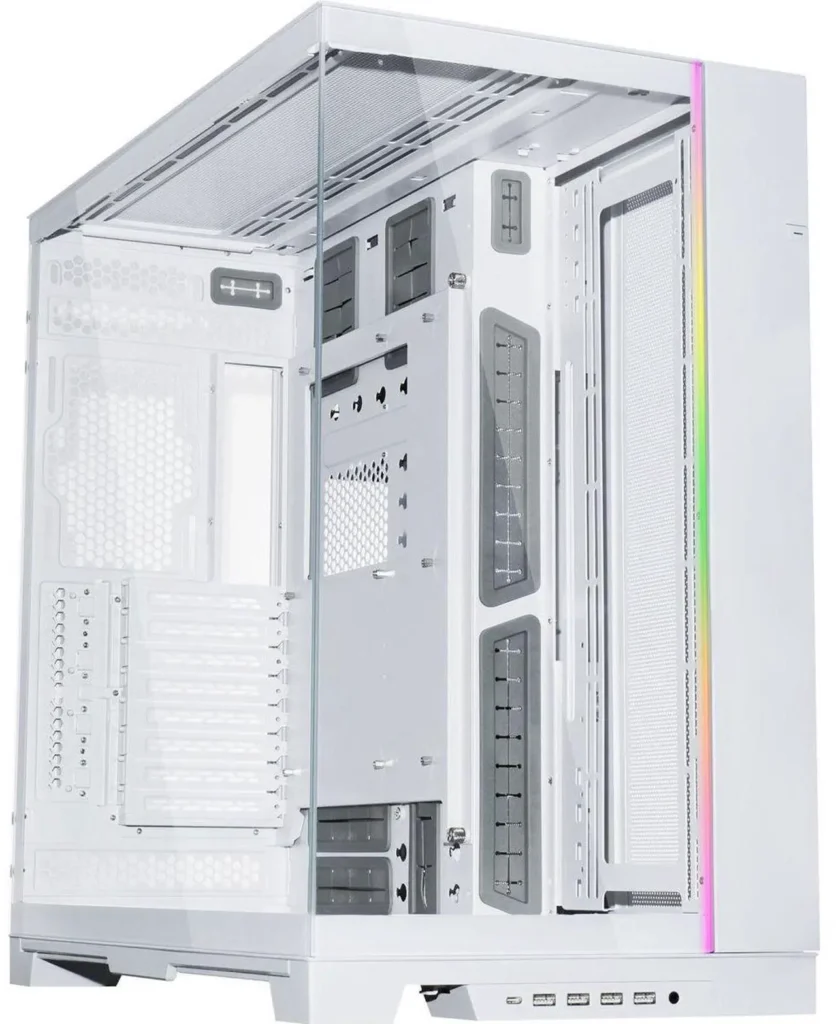
Lian Li O11 Dynamic Evo White (~$249 on Newegg): the O11 Dynamic in white is the most photographed PC case on the internet for good reason. Dual-chamber design, excellent glass panels on front and side, support for triple 360mm radiators, 420mm GPU clearance. The white version matches well with ASUS and Lian Li’s own components. The interior is a clean off-white that doesn’t show fingerprints as badly as brighter white finishes. Requires more fans than a typical mid-tower to create effective airflow through the dual-chamber layout, budget three 120mm intakes at the bottom and three 120mm radiator fans at the side as a baseline.Lian Li O11 Dynamic Evo White ($249)
NZXT H9 Elite White (~$139 on Newegg): premium panoramic case with glass on four sides. The white interior is exceptionally clean and pairs well with white components. Top radiator support for a 360mm AIO. GPU clearance to 435mm. The downside is that being glass on all sides means cable management must be genuinely good, there’s nowhere to hide a mess. If you’ve never built in a case this restrictive on cable routing, the H9 Elite is not the first white build to start with.NZXT H9 Elite White ($131)

Fractal Design North White (~$154 on Newegg): wood-grain front panel in white oak, white steel body, clean interior finish. A completely different aesthetic from the glass-heavy gaming cases, minimalist, desk-appropriate, quieter by default because the front panel restricts some airflow. If your white build sits in a home office rather than a gaming battlestation, the North White is the case that doesn’t look out of place. 240mm or 280mm radiator support at the front, 240mm at the top, 120mm at the rear.Fractal Design North White (123)

Phanteks Eclipse P400A White (~$90 on Newegg): budget-tier white mesh-front case with genuine airflow. Simpler than the premium options, less glass, but the white finish is clean and the airflow performance is solid for the price. Three 120mm fan slots at the front, one 120mm exhaust rear, 360mm radiator support at the front. The right choice if the budget is the constraint.How to Set Up PC Fan Airflow
The GPU: The Most Important White Component
The GPU is the visual centrepiece of most glass-panel builds. It’s also the most expensive component and the one where white options have the best selection right now in 2026.
At the high end, the MSI Gaming Trio RTX 5070 Ti White and ASUS TUF Gaming RTX 5070 Ti White both run roughly $1,100–$1,200 on Newegg as of early September 2026 (white AIB premium on top of ~$1,100 5070 Ti street). These are proper flagship 4K cards in clean white shrouds. The MSI Gaming Trio White has the larger triple-fan cooler and generally runs quieter under load. The ASUS TUF White is slightly more compact and uses ASUS’s BTF back-connect power system on the BTF variant, useful for white builds where visible power cables are the hardest element to manage cleanly.

For 1440p builds, the MSI Gaming Trio RTX 5070 White near ~$850–$950 (black 5070 street is ~$799; white premium AIBs sit higher) is the GPU to buy. Twelve gigabytes of GDDR7, excellent thermals from the triple-fan cooling design, and one of the cleanest white GPU aesthetics available. MSI Gaming Trio RTX 5070 White (!,077)

The XFX Swift RX 9070 XT White near ~$739–$820 is the AMD alternative: 16GB of GDDR6, RDNA 4 architecture, and a genuinely clean white shroud design (SpecClear’s early-Sept 9070 XT baseline is ~$739 before white premium). AMD’s FSR 4 support matters for white builds if you’re running an older monitor without G-Sync, since FSR 4 is hardware-agnostic for display compatibility.XFX Swift RX 9070 XT White ($509

At the budget tier, the ASUS Dual RTX 5060 White near ~$449–$520 on Newegg (matching the ~$449 5060 street baseline plus white premium) is the entry point for a white build that still has good gaming credentials. Eight gigabytes of GDDR7 limits it at 1440p in demanding titles; if 1080p is your resolution, the VRAM ceiling isn’t a problem.
The XFX RX 9060 XT White with 16GB GDDR6 sits near ~$469–$520 (9060 XT 16GB street ~$469) and is the better long-term choice at this price point for anyone planning to run 1440p in the future.Best RAM for Gaming in 2026
The honest caveat on white GPUs: they’re typically $30-$80 more than the equivalent black version of the same card. That premium buys the white shroud and nothing else: performance is identical. Whether $50 is worth it for a component you’ll see every time your PC side panel is off is a personal call. If the build is primarily about aesthetics, yes. If you’re budget-constrained and performance is the priority, buy the black version and save the money for better RAM or an extra storage drive.
The Motherboard: White PCB Is Worth It in a White Build
White motherboards used to mean a white PCB covered in black heatsinks. The current Gigabyte ICE and AORUS ICE range changed that. The Gigabyte X870 AORUS ELITE WIFI7 ICE (~$239 on Newegg) has white PCB, white heatsinks, white M.2 covers, white I/O cover, and matches the bright clean white of the AORUS aesthetic consistently. It’s AM5, supports PCIe 5.0, WiFi 7, USB4, and handles every current Ryzen chip without issue.Gigabyte X870 AORUS ELITE WIFI7 ICE ($239)

The Gigabyte B850 AORUS ELITE WIFI7 ICE (~$229 on Newegg) is the budget step-down: still white PCB and white heatsinks, still AM5 and DDR5, but without the X870’s USB4 and some of the premium connectivity. For a gaming-focused white build that doesn’t need USB4, the B850 ICE saves $80 that belongs on the GPU.Gigabyte B850 AORUS ELITE WIFI7 ICE ($209)

If you’re running Intel on LGA1851, the white motherboard selection is thinner. ASUS makes a white ROG Strix Z890 variant but it’s $400+. The more practical Intel white build approach is a black motherboard with white components everywhere else, the motherboard lives mostly behind the GPU and AIO in most cases and isn’t as visible as guides make it sound.Best Motherboard for Gaming 2026
The CPU Cooler: The Second Most Visible Component
The AIO cooler pump head sits directly on the CPU, wiring connects through the motherboard, and the radiator and fans mount at the front or top where they’re visible through glass. In a white build, the entire AIO assembly needs to be white, pump head, radiator, tubing, and fans.
NZXT Kraken Elite 360 RGB White (~$465 on Newegg): NZXT’s premium AIO in white. Clean pump head design with an integrated LCD display that shows temperature, custom GIFs, or CPU metrics. Three 120mm white RGB fans included. The tube length is generous enough to reach most mounting positions in large mid-towers. Cooling performance keeps pace with EK’s comparable 360mm AIO. The white finish is NZXT’s characteristic slightly-warm off-white, works well with ASUS white components, less perfectly with Gigabyte’s brighter ICE white.NZXT Kraken Elite 360 RGB White Air Cooler vs AIO CPU Cooler 2026 ($465)

MSI MPG CoreLiquid P360 White (~$149 on Newegg): MSI’s competing 360mm AIO in white with the same LCD display format. The white pump head matches well with MSI’s own GPU designs, making it the natural pairing for a MSI Gaming Trio GPU white build. Slightly more aggressive cooling performance than NZXT under sustained load. Three 120mm ARGB fans included.MSI MPG CoreLiquid P360 White ($149)

be quiet! Pure Loop 2 FX 360 White (~$150 on Newegg): if RGB isn’t the priority and quiet operation is, the be quiet! Pure Loop 2 FX in white is exceptionally quiet at gaming loads. No LCD, no elaborate lighting. Just effective cooling, white finish, and near-inaudible fan noise at speeds below 1200 RPM. Pairs with any white case regardless of brand because its finish is neutral.How to Cable Manage Your PC
For budget white builds where AIO cost is prohibitive: the DeepCool Assassin IV White (~$75 on Newegg) is a tower air cooler in all-white finish with impressive cooling performance that competes with 240mm AIOs. Shorter than most dual-tower air coolers, 165mm height, which clears RAM in more cases than the taller competition. Not as visually spectacular as an AIO radiator filling the top of the case, but significantly cheaper and genuinely effective for chips up to the 9800X3D.
RAM: White Spreaders Are Widely Available
White DDR5 RAM is readily available from G.Skill, Kingston, and Corsair in 2026. The premium over equivalent black kits runs $10-$30 for a 32GB kit, worth paying in a white build.
G.Skill Trident Z5 RGB White DDR5-6000 CL30 32GB (~$390–$450 on good days; SpecClear DDR5 32GB baseline ~$375–$420 plus white premium): the white RGB kit that most builds end up with. CL30 at 6000 MHz is the AM5 sweet spot. The white aluminium spreader with white RGB diffuser looks clean against a white motherboard. Tight on clearance next to some large AIO pump heads, check the cooler’s RAM clearance spec before buying.G.Skill Trident Z5 RGB White DDR5-6000 CL30 32GB ($519)

Kingston Fury Beast White DDR5-6000 CL36 32GB (~$375–$430 on good days): budget white DDR5 with a lower-profile heatspreader that clears almost any cooler. CL36 versus CL30 is a 1-2% gaming performance difference, not worth paying $100 more for in most builds. If you’re pairing with a DeepCool Assassin IV or any large air cooler, the Kingston Fury Beast’s lower profile is genuinely useful.Beast White DDR5-6000 CL36 32GB ($499)

Cables: The Detail That Separates Good Builds From Great Ones
Standard PSU cables are black. Running black cables through a white build undermines the entire aesthetic. White cable extensions and custom sleeved cables are the fix.
Cable Mod and Cablemod-equivalent brands sell 24-pin ATX, EPS CPU power, and PCIe power cable extensions in white for $40-$80 depending on how many cables you replace. You use your existing black cables behind the motherboard tray for the actual power delivery and run white extension cables through the visible portion of the case. The extensions are long enough that only the white sleeved section is visible through the glass panel.
This is the single highest-impact aesthetic upgrade in any white build and the one most guides bury in the final paragraph. Do it. A white GPU and white AIO with black PSU cables running across the front of the case looks half-finished. White cables make it look complete.
The Pitfalls: What Kills White Builds
Mixing manufacturer white shades without checking: an NZXT off-white case with a Gigabyte ICE bright-white GPU and an ASUS TUF warm-white AIO will be visibly mismatched in person. Pick a primary white tone, bright, off-white, or warm, and build around it.
Buying a white case with a solid front panel: a white case with a solid acrylic or tempered glass front panel severely restricts airflow to the front intake fans. A white build with poor airflow runs hot. Hot components throttle performance and shorten lifespan. The Lian Li O11, NZXT H9, and Phanteks P400A all have mesh or adequately ventilated front panels. Avoid purely aesthetic cases with solid fronts unless you’re confident the rear intake options compensate.
Ignoring cable management: white builds are the worst case scenario for poor cable management because everything inside is visible and high-contrast against black cables. If you’re not comfortable routing cables behind the motherboard tray, a white build will punish you aesthetically in ways a black build would hide. Plan for the cable work before you buy the components.
Neglecting dust maintenance: set a calendar reminder for three months after build completion. White dust filters, white fan blades, and white interior surfaces all show dust accumulation in ways that black components forgive. Clean regularly or the build progressively looks worse.
The Budget Premium: What White Actually Costs You
Versus an equivalent black build at the same performance level, expect to pay approximately $150-$400 more for a complete white aesthetic depending on how many components you buy white. The breakdown for a typical 1440p white gaming build:
White GPU versus black equivalent: +$50-$80. White motherboard (ICE) versus black equivalent: +$20-$40. White AIO versus black equivalent: +$20-$40. White RAM versus black equivalent: +$10-$20. White cable extensions: +$40-$80. White case versus comparable black case: +$10-$30 at most tiers.
Total white premium across a full build: approximately $150-$290. Whether that’s worthwhile depends entirely on how much the aesthetic matters to you. The components perform identically. You’re paying for the appearance.